creavoid – Where Innovation Meets the Future

Category: Online Business & Marketing

Unlock the potential of your Online Business & Marketing with expert insights on graphic design, web development, and print-on-demand solutions. This section covers everything from productivity tools and SEO strategies to social media marketing and paid search advertising (SEA). Explore effective payment systems like moss, PayPal, and Wise, and stay ahead in the world of online trading. Whether you’re looking to improve your skills through online courses or optimize your digital presence, this is your go-to resource for building and growing a successful online business.

  • Rich In-Depth Review of Recraft V3: A Designer’s Dream or Just Hype?

    Rich In-Depth Review of Recraft V3: A Designer’s Dream or Just Hype?

    Recraft V3 is a revolutionary AI model and image generator that promises top-notch quality and customization. Does it live up to these claims? Find out as we review its key features and performance.

    Key Takeaways

    • Recraft V3 is an AI image generation model that offers exceptional image quality, customization, and user control, catering to a diverse audience of over 1.5 million users globally.

    • The platform provides an intuitive interface with robust collaboration tools, allowing teams and individual designers to create high-quality visuals efficiently, while also offering extensive export options that cater to the needs of a professional designer.

    • Despite some minor text inaccuracies, Recraft V3 excels in speed and realism, positioned as a cost-effective alternative to competitors like DALL-E and MidJourney, with a pricing structure that enhances its value for both casual and professional users.

    Introduction to Recraft V3

    Recraft V3 - AI Image Generator
    Recraft V3 – AI Image Generator

    The latest iteration of the Recraft AI image generation tool, known as Recraft V3, is celebrated for its extensive adoption by over 1.5 million users across the globe. Promoted as a premier option for crafting high-quality images, this new recraft model touts unparalleled options for customization and enhanced user control capabilities. It has secured a leading position in various benchmarks, which testifies to its capability in producing top-notch image quality.

    With a focus on enhancing the user experience, Recraft V3 sets out to empower users with superior control over their AI-generated images. It can generate images with high detail and quality across various complex prompts, making it suitable for commercial use and ranking performance on leaderboards. But can it fulfill these ambitious promises?

    Our evaluation will put these claims under scrutiny to determine if Recraft V3 truly revolutionizes the design landscape and adheres to its lofty aspirations. Keep an eye out as we delve into the features offered by this model, assess its performance levels and weigh up its overall worthiness within the realm of AI image generation tools.

    ‍Winning AI image generation quality benchmarks

    Recraft v3 sets new standards in the production of image. Recraft V3 has recently taken part in Artificial Analysis leading text-image modelling competition (As of November 2024). It was ranked number 1 in ELO 1172. Recraft is now producing quality better than those from Midjourney, FLUX and many other image generation firms. Machine learning leaders have been developed by analyzing data from a variety of datasets to evaluate performance and compare them with the performance for different tasks and sets.

    Target Audience for Recraft V3

    Recraft V3 serves a vast array of over 1.5 million users hailing from approximately 200 nations, and it owes its widespread popularity to the platform’s ability to produce images fit for commercial use. This aspect is highly beneficial for pro designers across various work environments, including freelancers, agencies, and expansive design teams—offering them an array of tools that can significantly enhance their creative output.

    Structured with both complimentary and premium options, Recraft V3 ensures accessibility to its extensive suite of AI image editing tools for both novice users and experienced designers. The model promotes collaborative efforts among team members by providing features that allow shared access to projects as well as facilitating instantaneous feedback—an essential component in refining design processes.

    For developers looking to embed sophisticated image generation capabilities into their own software offerings. Recraft provides an API tailor-made for such integration—a boon particularly advantageous for marketers and content producers who aim at crafting eye-catching visual materials efficiently. In essence, Recraft V3 has been crafted with consideration towards satisfying a spectrum ranging from individual artists up to major corporations’ needs.

    Getting Started with Recraft V3

    Embarking on the journey of creating vivid images with Recraft V3 is a hassle-free experience, designed to enable users to rapidly engage in image generation. One initiates by selecting Recraft V3 from the list of available models. To unlock access to all its creative features, users simply register or log into the system.

    To generate an image, participants articulate their vision for the picture they want created, specifying aspects like style, subject matter, color schemes and distinctive features. With these details provided as input through a prompt and once ‘Generate AI image’ is clicked, Recraft V3 utilizes AI technology via an AI image generator for swift production of high-resolution visuals. This empowers convenient exploration across different prompts and adjustments enabling dynamic images creation.

    After the platform has produced an initial visual piece using AI generation techniques, content creators have opportunities to tailor settings according to their specialized preferences—altering size,color variation, and other variables are among those modifiable attributes.The user-friendly design makes it accessible even to novices within the field of imagine manipulation ensuring that process reconfiguring generated results remains smooth outcome enhancing activities.

    Tools and Requirements
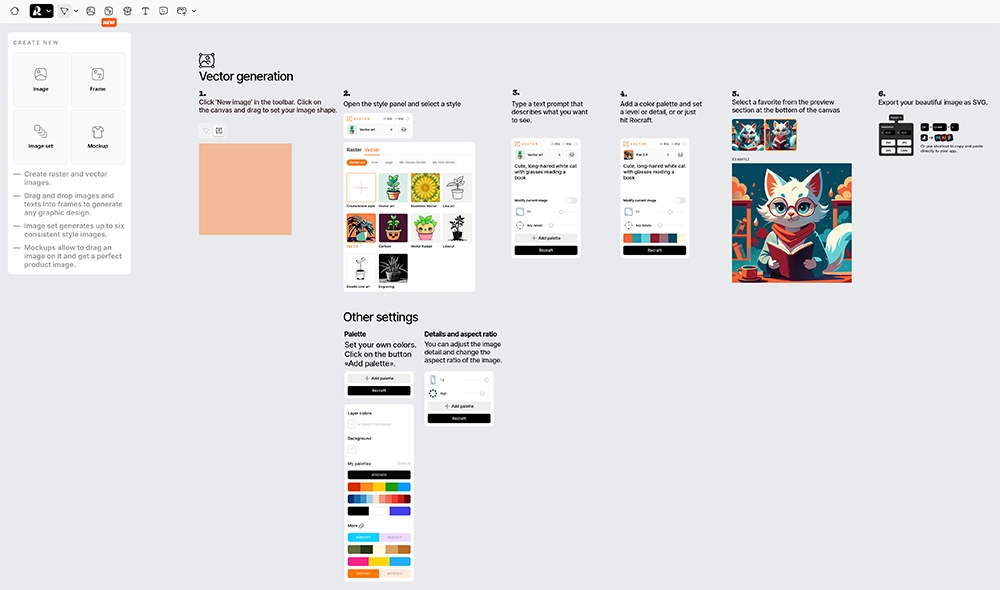
    Recraft V3 - Generative AI Images Tools
    Recraft V3 – Generative AI Images Tools

    For optimal functionality, a stable internet connection is crucial since Recraft V3 functions on both desktop and mobile platforms. It has been developed to provide easy access whether you are using a computer or mobile devices including those powered by iOS or Android.

    The refreshed version of the model introduces an array of export possibilities, enabling users to save their work in formats like SVG, PNG, and JPG based on what best aligns with their requirements. The addition of advanced features such as vector art image generation and a comprehensive assortment of AI-powered editing tools increases its adaptability for vector image generation.

    Recraft V3 is designed to facilitate various design endeavors owing to its device compatibility range and multiplicity of export choices. Designers can leverage this toolset for crafting and disseminating high-fidelity images across different mediums.

    Design Interface and Usability
    Recraft V3 - Design Interface and Usability
    Recraft V3 – Design Interface and Usability

    Recraft V3’s design platform is laden with advanced features while remaining accessible, though mastering its capabilities may require some dedication from professional designers. The time spent learning the system pays off due to Recraft V3’s emphasis on intuitive user experiences that cater equally to novices and experts in design.

    Its array of tools for refining custom styles without having to retrain the model offers creative freedom for testing various visual themes. Recraft V3 enhances this versatility by incorporating sophisticated options such as color modification and background elimination, which are essential for producing refined, professional-looking designs.

    Collaborative efforts are made seamless through real-time interaction within the platform – a feature particularly beneficial during an iterative design process. Professional designers can effectively collaborate, share their creations instantly, and receive prompt feedback. Precision in text sizing and placement contributes to making navigation straightforward throughout the image creation journey.

    Lastly, Recraft V3 provides diverse models including photo-realistic images and generate vector art selections among its image templates. This wide-ranging support accommodates different aesthetic preferences allowing creators to generate visuals that precisely match their intended style—be it highly detailed realism or abstract vector illustrations.

    Customization Features

    Recraft V3 excels at customization, granting users precise control over the integration of text into their designs. This model is particularly effective for elaborate projects that require careful attention to where and how text appears. By manipulating various attributes such as size, location, and style of the text, users can tailor each design to meet specific needs. Designers benefit immensely from this granular level of personalization when tackling intricate tasks.

    The platform empowers designers by allowing them to upload reference images that help ensure consistency with brand identity across all their creations. The ability to refine image proportions and aspect ratios offers additional ways for users to customize their work on Recraft V3. Thus enabling a distinctive branding approach while ensuring visual harmony throughout different endeavors.

    Recraft V3 is adept at crafting detailed scenes with precision management over elements like quantity, color schemes, and spatial arrangement within an image. These functionalities render it an invaluable resource for designers aiming to produce sophisticated graphics filled with complexity and aesthetic appeal.

    Material and Durability

    Recraft V3 accommodates the use of both vector and raster image formats, giving designers the flexibility to select the ideal format for their unique project requirements. Downloads in high-resolution are offered, pivotal for tasks that demand images with clarity and intricate detail.

    When considering printing designs, it is essential to acknowledge that the longevity of printed visuals heavily relies on the caliber of paper and ink employed. By opting for appropriate materials, designers can guarantee that their printed images preserve their integrity over an extended period. This makes Recraft V3 a dependable option when aiming to produce enduring graphics.

    Image Quality and Realism

    Recraft V3 - Photorealistic AI Image Generation
    Recraft V3 – Photorealistic AI Image Generation

    The exceptional image generation capabilities of Recraft V3 have earned it a prominent position on Hugging Face’s Text-to-Image Benchmark and Artificial Analysis (As of November 2024). Users heap praise on the model for producing images with extraordinary realism and attention to detail, underlining its dominance in terms of performance quality.

    In the realm of generating hyper-realistic AI images, Recraft V3 has managed to eclipse other existing models by delivering superior image quality and lifelike results. Despite infrequent minor lapses in text representation, the overall visual fidelity produced by this new model remains impressively high-grade. This emphasis on intricate details positions it as an ideal tool for designers who aim to generate visually captivating content.

    Feedback from users reinforces that despite sporadic textual discrepancies, Recraft V3’s output is visually compelling due to its fine-tuning towards anatomical precision—ensuring realistic proportions and spatial integrity within generated images. Such meticulousness plays a significant role in crafting top-tier visuals.

    In summation, what sets Recraft V3 apart is not just its outstanding AI-generated image clarity but also its commitment to achieving realism and accurate anatomical depiction—a claim backed up by developer assertions. Benchmarked through community-driven evaluations where it outshines rivals such as DALL-E 3 and Midjourney, Recraft V3 proves itself as a leading figurehead in the sphere of AI-powered text-to-image creation processes.

    Speed and Efficiency

    Speed and efficiency in image generation with Recraft V3.

    Recraft V3 is capable of creating images in a mere 15 seconds, offering an effective solution for designers seeking swift graphic outputs. The ability to produce quality graphics quickly is particularly advantageous for those who need immediate results without sacrificing the integrity of their designs. Recraft V3’s image creation pace is notably quicker than that of its rival DALL-E 3, which takes approximately double the time at around 7 seconds per image.

    Despite its rapid production capabilities, Recraft V3 places a significant emphasis on maintaining high-quality output, which may cause it to take slightly longer compared to others that prioritize speed above all else. Nevertheless, this compromise between meticulousness and promptness serves well for endeavors where detailed imagery is essential but urgency isn’t paramount.

    For assignments necessitating extensive detail work, Recraft V3 optimizes rendering speeds effectively even if it doesn’t lead the pack in velocity among similar tools. Designers who value the aesthetic excellence of their images over quick generation rates will find this balance agreeable and suitable for their needs.

    Handling Complex Scenarios

    Recraft V3 excels in producing precise and attractive renderings of every component, an essential feature for dealing with complex scenes. It demonstrates its remarkable talent in controlling a multitude of elements accurately, whether the task involves creating a vibrant urban environment or executing an elaborate interior design.

    When applied to situations mirroring real life, Recraft V3 showcases its proficiency in navigating through complex scenes. Despite facing minor hurdles like sporadic textual errors, these do not detract from its adeptness at fabricating detailed and aesthetically pleasing designs.

    Overall Value and Cost-Benefit Analysis

    Recraft V3 has structured its pricing to accommodate the varying needs of users, ranging from those who use it occasionally to professionals. The cost for producing 100 images is only $4.00, which may be more cost-effective than other options available on the market. Despite this affordability, Recraft V3 maintains a high standard in image generation quality and consistently surpasses prominent competitors such as MidJourney and OpenAI.

    As an alternative to DALL-E that stands out for its exceptional image quality and versatile customization features, Recraft V3 has garnered acclaim among design professionals who require precise raster and vector images coupled with expansive editing capabilities that allow greater creative freedom.

    In summary, Recraft V3 melds reasonable pricing with superior performance metrics effectively. Offering a breadth of comprehensive features along with diverse customization possibilities renders it an indispensable asset for designers intent on advancing their work’s caliber through enhanced tools designed specifically for top-quality image generation.

    Summary

    In essence, Recraft V3 emerges as a formidable tool in the realm of image generation, fulfilling its pledges adeptly. Boasting sophisticated features and superior image quality alongside an array of personalization possibilities, it establishes a fresh benchmark within the domain of AI-powered design instruments. It provides professional designers and artistic aficionados alike with enhanced tools and capabilities to elevate their creations.

    We invite you to delve into the experience that is Recraft V3, tapping into its impressive capacity directly. Its synthesis of cost-effectiveness, high-caliber output, and adaptability renders it an excellent acquisition for individuals dedicated to advancing their design aspirations.

    Frequently Asked Questions

    What is Recraft V3 known for in comparison to DALL-E?

    For designers seeking a leading alternative to DALL-E 3, Recraft V3 stands out with its exceptional image quality and broad range of customization options.

    What unique feature does Recraft V3 offer regarding text in images?

    Recraft V3 uniquely enables image generation with text of any size and length, providing significant flexibility that sets it apart from other models.

    What are the main advantages of using DALL-E 3?

    DALL-E 3 offers high-quality image generation, seamless integration with ChatGPT for enhanced text interpretation, and is invaluable for ideation and marketing purposes.

    What are the disadvantages of using DALL-E 3?

    DALL-E 3 offers limited customization tools and exhibits lower text-to-image quality compared to other platforms such as Recraft V3. These constraints may affect the user experience and the quality of generated content.

    How many creators use Recraft, and how many images have been generated on the platform?

    Recraft boasts over 1.5 million creators from 200 countries, having generated more than 200 million images on the platform.

  • Web Hosting with Hostinger: Reliable and Affordable Hosting in 2025

    Web Hosting with Hostinger: Reliable and Affordable Hosting in 2025

    Did you know that Hostinger, a top web hosting provider, holds a 4.7/5 rating from over 4,500 reviews? This rating underscores Hostinger’s high-quality hosting services. In today’s digital age, having a dependable provider like Hostinger, which combines affordability with powerful features, is essential for establishing a strong online presence.

    It’s a great choice for both individuals and businesses.

    Web Hosting with Hostinger
    Web Hosting with Hostinger

    Web Hosting with Hostinger has many hosting options, like shared, cloud, and VPS server. It’s perfect for all kinds of websites and budgets. As a WordPress-recommended host, it ensures your WordPress sites run smoothly and securely. Plus, with managed and shared web hosting, you can grow your online presence without worrying about the tech side.

    Hostinger plans come with a free domain for annual subscriptions. This makes starting your website easy, as you handle both domain and hosting with one provider. Also, Hostinger offers a 30-day money-back guarantee. This lets you try their services without worry.

    Key Takeaways

    • Hostinger boasts high customer ratings, averaging 4.7/5 from over 4,500 reviews
    • Offers a variety of hosting solutions, including shared plan, cloud, and VPS hosting
    • Recommended by WordPress.org for optimal WordPress site performance and security
    • Provides a free domain with annual plans, simplifying website setup and management
    • 30-day money-back guarantee ensures customer satisfaction and risk-free trials

    Introduction: Why Choose Hostinger for Your Web Hosting Needs?

    Choosing a web hosting provider means looking for reliability, affordability, and great features. Hostinger is a trusted name with over 29 million users worldwide since 2004. It’s known for its top-notch hosting solutions for both individuals and businesses.

    Hostinger stands out for its affordable plans. It has something for everyone, from beginners to professionals. You can choose from shared, cloud, and VPS hosting to find the best fit for your needs.

    Hosting TypeStarting PriceBest Suited For
    Shared Hosting$2.99/monthSmall websites, blogs, and personal projects
    Cloud Hosting$9.99/monthGrowing websites, e-commerce stores, and high-traffic sites
    VPS Hosting$3.95/monthResource-intensive applications, custom server configurations
    Hostinger Web Hosting Plans

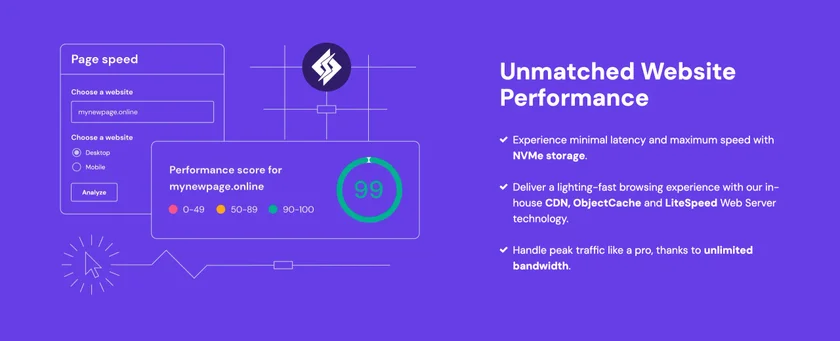
    Hostinger also focuses on speed, security, and reliability. It uses advanced technology like SSD storage and LiteSpeed web servers for fast websites. Plus, it has strong security features like SSL certificates, backups, and DDoS protection.

    I’ve been using Hostinger for my personal blog for over a year now, and I couldn’t be happier with the service. The affordable pricing, user-friendly interface, and reliable performance have made my hosting experience a breeze.

    Hostinger’s hPanel makes managing your website easy. It’s designed for everyone, not just tech experts. You can handle your websites, domains, email, and databases all in one place.

    Hostinger also offers many tools and features. You get a hostinger website builder, one-click app installers, free domain registration, and email hosting. It’s a complete package to help you grow your online presence.

    Affordable Web Hosting with Hostinger’s High-Performance Hosting Services

    ​In today’s digital landscape, having a reliable and high-performance web hosting solution is essential for businesses of all sizes, especially those in the e-commerce sector. Hostinger has emerged as a strong contender in the hosting industry, offering a range of services tailored specifically to meet the demands of online entrepreneurs and retailers. With a commitment to speed, security, and scalability, Hostinger provides an optimal environment for setting up and managing e-commerce websites.

    One of the standout features of Hostinger’s high-performance hosting solutions is their emphasis on speed. With advanced technology, including LiteSpeed web servers and SSD storage, websites hosted on their platform experience faster load times, which is crucial for retaining customers and reducing bounce rates. In the world of e-commerce hosting, every second counts, as slow-loading pages can lead to lost sales and frustrated customers. Hostinger’s infrastructure ensures that online stores can function smoothly even during peak traffic periods, enabling businesses to deliver an exceptional shopping experience.

    Security is another area where Hostinger excels, offering features like free SSL certificates, automated backups, and robust firewall protection. For e-commerce businesses, safeguarding customer data and payment information is paramount. Hostinger’s hosting solutions not only provide the tools needed to protect sensitive information but also instill trust in customers, ultimately boosting conversion rates. Furthermore, their user-friendly interface makes it easy for users of all experience levels to set up and manage their hosting environment without needing extensive technical knowledge.

    Scalability is a crucial aspect of any e-commerce platform, and Hostinger doesn’t disappoint in this regard. Whether you’re starting with a small online store or planning to expand into a large marketplace, their hosting solutions are designed to grow with your business. Hostinger offers a variety of plans that cater to different requirements, enabling users to upgrade seamlessly as their traffic increases. With comprehensive customer support available 24/7, businesses can focus on growth and innovation while knowing their hosting provider has their back. In summary, Hostinger’s high-performance hosting solutions offer an invaluable asset for any e-commerce venture aiming for success in a competitive market.

    Hostinger offers a wide range of hosting solutions for all website owners. Whether you’re starting out or managing big projects, Hostinger has the right plan for you. They have shared, cloud, and VPS hosting options that grow with your site.

    Shared Hosting Plans

    Hostinger’s shared hosting plans are great for beginners or small sites. They have Premium, Business, and Cloud Startup plans. These plans offer storage, bandwidth, and features for a low cost.

    Cloud Hosting Services

    For high performance and powerful resources, choose Hostinger’s cloud hosting. It’s perfect for big projects. The Hostinger Cloud Startup plan starts at $7.99/month and offers 3 GB RAM and 200 GB NVMe storage.

    Cloud Hosting PlanRAMNVMe StorageCPU CoresPrice (48-month term)
    Cloud Startup3 GB200 GB2$7.99/month
    Cloud Professional6 GB250 GB4$14.99/month
    Cloud Enterprise12 GB300 GB6$29.99/month

    Hostinger’s cloud hosting has a 99.9% uptime guarantee. It also includes a dedicated IP, CDN, integrated caching, and a 30-day money-back guarantee. With data centers worldwide, your site will be fast and reliable.

    VPS Hosting Options

    Hostinger’s VPS hosting gives you full control over your server. It’s perfect for customizing your server environment. VPS plans start at $4.99 per month, making it affordable for developers and businesses.

    Hostinger’s high-performance hosting solutions, including shared hosting, cloud hosting, and VPS hosting, provide the perfect foundation for your website to thrive online.

    User-Friendly Control Panel and Website Management Tools

    At Hostinger, we know how important a good control panel is. That’s why we created hPanel. It makes managing your web hosting account and website easy.

    hPanel supports over ten languages, including English and Spanish. This makes it easy for people from all over to use and manage their hosting accounts.

    Hostinger also has a powerful website builder. It lets you make professional websites without coding or design skills. The drag-and-drop interface makes it simple to customize your website.

    With Hostinger’s website builder, I was able to create a stunning website for my business in just a few hours, without any prior experience in web design.

    The website builder has many professionally designed templates. These templates are great for starting your website. You can easily change them to fit your brand’s style.

    Control PanelKey Features
    hPanelMultilingual support (over 10 languages) Intuitive interface for easy account management Streamlined troubleshooting and routine checks
    cPanelOldest web hosting control panel (released in 1996) Exclusively designed for Linux-based hosting Robust security features with SSL protocol
    PleskSupports both Windows and Linux servers Two versions: Onyx (deprecated) and Obsidian (improved UI and features) Tools for efficient site maintenance and SEO

    Whether you’re new or experienced, Hostinger’s tools make managing your website easy. With these tools, you can focus on growing your online presence.

    Ensuring Top-Notch Security for Your Website

    At Hostinger, we know how important website security is to our customers. We go the extra mile to keep your website safe from online threats. Our advanced security features mean you can relax, knowing your site is secure.

    We offer SSL certificates to keep your website’s data safe. SSL encryption protects sensitive information, building trust with your visitors. All hosting plans come with unlimited free SSL certificates, so you don’t have to pay extra. Enabling SSL not only boosts security but also improves your site’s credibility and search rankings.

    Regular backups are also key to website security. Hostinger provides automatic backups to protect your files and data. Our Business and Cloud Startup plans include daily backups. This means your website is always safe from data loss. If something goes wrong, you can quickly restore your site, reducing downtime and damage.

    DDoS Protection

    DDoS attacks can be a big problem for website owners. They overwhelm servers with malicious traffic, making sites unreachable. Hostinger takes DDoS protection seriously, offering full protection with Cloudflare. This keeps your website safe from DDoS attacks, ensuring it stays online and accessible.

    A DDoS attack is intended to flood a website’s servers with so much traffic that it becomes unavailable to real visitors.

    Here’s a comparison of DDoS protection costs across different web hosting providers:

    Web Hosting ProviderDDoS Protection Cost (per month)
    HostingerIncluded in all plans
    Provider A$10 – $50
    Provider B$20 – $100
    Provider C$15 – $75

    Hostinger also offers many other security features to protect your website:

    • Malware scanning and removal
    • Secure account isolation
    • Firewall protection
    • Secure access control

    With Hostinger’s strong security measures, you can focus on growing your online presence. Our dedicated security team works hard to monitor and mitigate risks. This ensures your website stays protected at all times.

    Web Hosting Plans Optimized for Speed and Performance

    Choosing a web hosting provider means looking at speed and performance. Hostinger knows this and has made its plans to boost your website’s speed and performance.

    Hostinger stands out because it uses SSD storage in all its plans. SSDs are much faster than traditional HDDs. This means your website loads quicker and works better.

    Fastest Web Hosting with LightSpeed Cache WordPress Plugin
    Fastest Web Hosting with LightSpeed Cache WordPress Plugin

    SSD Storage

    Hostinger’s focus on fast hosting is clear in its SSD storage. SSDs make your website data quick to access. This improves your visitors’ experience.

    LiteSpeed Web Server Technology

    Hostinger also uses LiteSpeed web server technology. LiteSpeed handles lots of traffic well. This means your website can handle more visitors without slowing down.

    LiteSpeed’s advanced caching and optimization make your website load faster. This makes it more responsive and friendly for users.

    Cloudflare CDN Integration

    Hostinger includes Cloudflare CDN in its plans. Cloudflare CDN spreads your website’s content around the world. This lets visitors see your site from the closest server.

    With Cloudflare CDN, Hostinger cuts down the distance between your website and visitors. This makes your site load faster and reduces delays. It’s great for websites that reach people all over the world.

    FeatureBenefit
    SSD StorageFaster read and write speeds for improved website performance
    LiteSpeed Web ServerEfficient handling of high traffic volumes and reduced server load
    Cloudflare CDNFast content delivery across the globe for consistent performance

    Hostinger’s mix of SSD storage, LiteSpeed, and Cloudflare CDN means your website will be fast and perform well. Whether it’s a small blog or a big e-commerce site, Hostinger’s plans help your website stay competitive online.

    Expert Customer Support Available 24/7 for best Web Hosting

    At Hostinger, we know how important good customer support is. That’s why we offer help 24/7. Our team is ready to answer any questions or solve any problems you might have.

    Web Hosting with Hostinger - Service and Support
    Web Hosting with Hostinger – Service and Support

    Our support team is made up of experts in web hosting. They can help with setting up your account, fixing technical issues, or improving your website’s speed. They’re always ready to help.

    One of our best features is live chat. You can talk to a support agent in real-time with just a few clicks. This means you get fast help whenever you need it. Our live chat is available all day, every day, no matter where you are.

    “I’ve been using Hostinger for my website for the past year, and I must say, their customer support has been exceptional. Whenever I had a question or encountered an issue, their live chat support was always available to help me out. The response times were impressive, and the support agents were knowledgeable and friendly. It’s reassuring to know that I can rely on Hostinger’s 24/7 support whenever I need it.”

    We also offer support by email. If you have a complex issue or prefer email, just send us a message. Our team will reply quickly with a detailed answer. We aim to solve your problems fast so your hosting experience is smooth.

    At Hostinger, we’re proud of our multilingual support. We know our customers come from all over and might want to talk in their own language. Our team speaks over 10 languages, so we can help you in your native tongue. Whether you speak English, Spanish, French, German, or another supported language, you’ll get clear and helpful support.

    Support ChannelAvailabilityResponse Time
    Live Chat24/7Under 2 minutes
    Email Support24/7Within 1 hour
    Knowledge Base24/7Instant access

    We’re dedicated to giving you the best customer support. Trust Hostinger to be your reliable partner online. Our expert team is always here to help you, 24/7.

    Affordable Hostinger Pricing and Value-Added Features

    Hostinger is known for its affordable hosting plans. They offer valuable features to help you grow online. Whether you’re starting small or big, Hostinger has options for everyone.

    Hostinger’s pricing is attractive because of the free domain offer. This is true for most plans, except the Single plan, if you sign up for a year or more. It saves you money on domain names, making it easier to start your website.

    Free Domain Registration

    Hostinger goes beyond just low prices. They give you a free domain for the first year with most plans. This is if you commit to a 12-month subscription. It’s a great way to start your online journey without extra costs.

    Website Builder Included

    Building a website is easy with Hostinger’s website builder. It’s included in all plans and is easy to use. You can pick from many templates and edit your site without coding. It’s perfect for creating a website that looks great and represents your brand well.

    Email Hosting Services

    Hostinger also offers email hosting with their plans. This lets you use professional email addresses with your domain. It makes your brand look better and makes it easier for people to contact you. Hostinger’s email hosting helps you manage your business communications smoothly.

    Here’s a quick look at Hostinger’s main web hosting plans:

    PlanMonthly PriceMonthly VisitsSSD Storage
    Starter$8525,0005 GB
    Pro$135800,00010 GB
    Business$1955,000,00015 GB

    Hostinger also offers a 30-day money-back guarantee. This lets you try their hosting risk-free. If you’re not happy within 30 days, you can get a full refund. It’s a great way to start your online journey without worry.

    Hostinger’s affordable hosting plans, with free domain, website builder, and email hosting, are perfect for anyone wanting a strong online presence without spending a lot.

    Seamless Website Migration to Hostinger

    Switching to Hostinger was easy thanks to their free website migration service. They offer this service with all hosting plans, no matter how many websites you have. This was a big help since I had many websites with my old provider.

    Website Migration to Hostinger
    Website Migration to Hostinger

    The migration process was simple. I just picked a hosting plan, filled out a form, and submitted it. Amazingly, 95% of websites are moved in under 20 minutes. This means no downtime or lost data, so my websites stayed online.

    I was paying $21.99 per month with HostGator, but Hostinger’s introductory pricing of just $3.99 per month was too good to pass up. By migrating to Hostinger, I’ll save an impressive $817 over the next four years compared to my previous plan.

    Hostinger’s wide range of hosting solutions was a big reason I chose them. They offer three main types of hosting:

    • VPS Hosting: Ideal for larger websites or those needing specific server settings
      • KVM 1 starting at US$ 4.99 / month
      • KVM 2 starting at US$ 6.99 / month
      • KVM 4 starting at US$ 10.49 / month
      • KVM 8 starting at US$ 19.99 / month

    Enjoy additional

    20% Off

    Hostinger’s cloud hosting plans really stood out. They have three tiers: Cloud Startup, Professional, and Enterprise. I chose the Cloud Professional plan for its great resources and features.

    Hostinger also gave me a 20% discount on my hosting. Plus, they have a 30-day money-back guarantee. This made me feel secure during the trial period.

    In conclusion, moving my website to Hostinger was a smart choice. It saved me money and gave me a reliable hosting solution. With their easy-to-use interface, top security, and great customer support, I’m confident my website is in good hands.

    Conclusion: Empowering Your Online Presence with Hostinger’s Web Hosting Solutions

    Hostinger is a top choice for reliable hosting. They offer many hosting solutions to help you build a strong online presence. Since 2004, they’ve served millions in over 178 countries, making them a trusted name in web hosting.

    Hostinger has plans for everyone, from beginners to pros. They offer shared hosting, cloud hosting, and VPS services. Their easy-to-use control panel and 24/7 support make sure you’re happy with your service.

    Hostinger also focuses on keeping your website safe and fast. They provide free SSL certificates, daily backups, and DDoS protection. With their advanced technology and global CDN, your website will load quickly and perform well. Choosing Hostinger means you get reliable hosting, affordable plans, and great support to help your online presence grow.

    FAQ

    What types of hosting plans does Hostinger offer?

    Hostinger has many hosting options. You can choose from shared hosting, cloud hosting, and VPS hosting. Each plan is designed for different needs and budgets, helping you find the right one for your website.

    Is Hostinger a reliable web hosting provider?

    Yes, Hostinger is a reliable web host. They serve over 3 million website owners worldwide. Their hosting is fast, secure, and reliable, ensuring your visitors have a great experience.

    Does Hostinger provide a free domain with their hosting plans?

    Yes, Hostinger gives you a free domain with their annual plans. This makes it easy to manage your hosting and domain with one provider.

    What is Hostinger’s refund policy?

    Hostinger has a 30-day money-back guarantee. If you’re not happy with their service, you can get a full refund within 30 days of purchase.

    Does Hostinger offer a website builder?

    Yes, Hostinger has a drag-and-drop website builder. It’s easy to use and lets you create professional websites without coding. They offer many templates to help you start your website.

    Can I transfer my existing website to Hostinger?

    Yes, Hostinger makes transferring your website easy. They offer free migration services for all plans. Most migrations take under 20 minutes, with no downtime or data loss.

  • Epic Rank Math SEO Plugin for WordPress: Optimize Your Ranking in 2025

    Epic Rank Math SEO Plugin for WordPress: Optimize Your Ranking in 2025

    Hey there, fellow website owners and bloggers! Are you tired of scratching your head over SEO for your WordPress website? Well, let me introduce you to your new best friend: The Rank Math SEO plugin for WordPress essential for optimizing your website’s performance. This nifty little tool is like having a personal SEO guru right in your WordPress dashboard. It’s packed with features that’ll help you climb those search engine rankings without breaking a sweat. Whether you’re a total newbie or a seasoned pro, Rank Math’s got your back. From keyword optimization to content analysis, this plugin does it all – and it’s so easy to use, you’ll wonder how you ever lived without it.

    Want to make your WordPress site more visible on Google? Rank Math is your go-to tool. It’s an all-in-one SEO solution that makes optimizing your site easy. With its advanced features and AI, Rank Math SEO helps you climb the search rankings.

    RankMath SEO Plugin for WordPress
    RankMath SEO Plugin for WordPress

    Rank Math is perfect for anyone wanting to improve their site’s SEO. It has a wide range of tools to help with everything from keywords to schema markup. Whether you’re new to SEO or have experience, Rank Math makes it simple to boost your site’s performance.

    • Rank Math is a powerful WordPress SEO plugin that uses AI to provide intelligent optimization recommendations.
    • It offers a comprehensive set of features, including on-page seo, schema markup, XML sitemaps, and more.
    • Rank Math integrates with Google Search Console and Analytics for valuable insights and performance tracking.
    • The plugin conducts detailed SEO tests and provides actionable suggestions for improving your site’s visibility.
    • Rank Math boasts lightweight code and a module-based system for fast loading and flexibility.

    Key Takeaways:

    What is the Rank Math SEO Plugin for WordPress?

    Rank Math is a top WordPress SEO plugin that makes your website better for search engines. It’s easy to use and has many features to help your site get more visitors and rank higher.

    Overview of Rank Math SEO Plugin

    Rank Math is a leading SEO plugin. It gives you tools and insights to boost your site’s SEO. You can optimize your website’s elements like titles, meta descriptions, and content.

    Key Features and Benefits

    Rank Math is special because it has many features for all users. It helps with keyword optimization, content analysis, and more. You can also use schema markup and generate XML sitemaps.

    • Focus keyword optimization: Optimize your content for target keywords and track your progress.
    • Content analysis and recommendations: Get actionable insights to improve your content’s SEO-friendliness.
    • Schema markup integration: Enhance your search engine listings with rich snippets Rank Math supports using built-in schema markup to enhance your site’s visibility.
    • XML sitemap generation: Automatically generate and submit XML sitemaps to search engines.
    • Redirection manager: Easily manage and create 301 redirects to maintain your site’s link equity.
    • Internal linking suggestions: Get recommendations for internal links to improve your site’s structure and navigation.

    Using Rank Math can make your site more visible, rank higher, and engage users better. It automates many tasks, so you can focus on creating great content.

    FeatureRank Math SEOYoast SEO
    Focus KeywordsUp to 5 keywords per post (free)1 keyword per post (free)
    Schema Markup16+ schema types (free)Limited schema types (paid)
    XML SitemapAutomated sitemap generation (free)Automated sitemap generation (free)
    Redirection ManagerBuilt-in redirection manager (free)Requires separate plugin (paid)

    Rank Math has quickly become one of the most popular WordPress plugins, thanks to its extensive feature set and user-friendly interface.

    Rank Math is great for bloggers, small business owners, and SEO experts. It offers powerful features, is easy to use, and is affordable. It’s a top choice for improving your WordPress CMS SEO.

    Easy Rank Math Setup Wizard and Configuration

    Setting up the RankMath WordPress SEO plugin is simple, even for beginners. The Rank Math setup wizard guides you through each step. This ensures your website has the best default settings.

    https://youtube.com/watch?v=Un8mlE3YpB8

    Step-by-Step Installation Wizard for Rank Math Settings

    RankMath’s capabilities rival those of Yoast SEO and Rank Math, making it a top choice. setup wizard makes configuring your SEO plugin easy. It guides you through each setting with clear explanations. This is helpful for both new and experienced users, ensuring your site is set up right.

    The setup wizard in Rank Math is a game-changer. It made the entire process so simple and straightforward, even for someone like me who’s not an SEO expert.

    Optimal Default Settings

    Rank Math comes with optimal default settings. These settings are great for most websites, saving you time. Some key default settings include:

    • Automatic generation of XML sitemaps
    • Optimization of titles and meta descriptions
    • Integration with Google Search Console
    • Enabling of breadcrumbs for better site navigation

    If your website needs something special, Rank Math lets you customize settings to fit your unique needs. Its modular design means you can turn features on or off. This keeps your site running smoothly without unnecessary extras.

    FeatureBenefit
    Setup WizardGuides users through installation and configuration
    Default SettingsOptimized for most websites, saving time and effort
    CustomizationEasily tailor settings to specific needs and preferences

    Rank Math SEO is ideal for anyone wanting to improve their WordPress site’s search engine ranking. Its easy setup and customizable rank math features make it great for all users. Plus, its powerful tools help your site perform at its best.

    Comprehensive On-Page Optimization

    Rank Math SEO Plugin for WordPress offers a robust set of on-page SEO features. It helps you optimize your content for search engines. With RankMath, you can easily fine-tune your posts and pages to target the most relevant focus keywords.

    Focus Keyword Optimization

    Targeting the right focus keywords is key to on-page SEO. Rank Math lets you optimize for multiple focus keywords. This gives you the flexibility to target various relevant search queries.

    By incorporating these keywords naturally, you can improve your chances of ranking higher in search engine results pages (SERPs).

    Content Analysis and Recommendations

    Creating SEO-friendly content can be a challenge. But Rank Math makes it easier with its in-depth content analysis and recommendations. The plugin analyzes your content against numerous ranking factors.

    It provides actionable suggestions to optimize your content for search engines. From keyword density to readability, the Rank Math plugin helps you create content that both search engines and users will love. As highlighted in this guide to affiliate blog websites, content optimization is crucial for attracting and engaging your target audience.

    Internal Linking Suggestions

    Internal linking is essential for on-page SEO. It helps search engines understand your website’s structure and relevance. Rank Math offers intelligent internal linking suggestions.

    It makes it easy to interlink your content effectively. By linking to other relevant posts and pages, you can improve your site’s navigation. This keeps visitors engaged and distributes link equity throughout your website.

    RankMath’s on-page SEO features, including focus keyword optimization, content analysis, and internal linking suggestions, provide a comprehensive toolkit for optimizing your WordPress website’s content and structure.

    By leveraging these powerful features, you can create content that ranks well in search engines. It also provides value to your readers. With RankMath, on-page SEO becomes a seamless part of your content creation process.

    This helps you achieve better search engine visibility. It drives more targeted traffic to your website.

    Rank Math SEO WordPress Plugin: Unleash the Power of SEO

    RankMath is a powerful tool for your WordPress CMS, Rank Math is an all-in-one solution for SEO. It helps you boost your search rankings. With its easy-to-use features, you can improve your site’s SEO and reach its full potential.

    image 4

    The Rank Math SEO Plugin for WordPress works well with popular page builders like Brizy, Elementor, and Divi. This makes it easy to optimize your site’s content right in your page builder. It saves you time and effort.

    RankMath’s free version offers many features. It’s great for WordPress users who want to improve their search rankings without spending a lot.

    With RankMath, you can use an unlimited number of focus keywords per post or page. This gives you more flexibility in optimizing your content. The plugin also has AI tools for analyzing your content. These tools give you detailed tips to improve your SEO.

    RankMath has different pricing plans for different users:

    PlanPriceFeatures
    Free$0Sufficient for most users
    Pro$4.92/month (annual billing)Additional features and support
    Business$20.99/month (annual billing)Track up to 20,000 keywords for 200 client sites using the Rank Math SEO plugin.
    Agency$49.99/month (annual billing)Support up to 750 client sites with 75,000 keywords to track

    Comparison of Rank Math SEO and Rank Math SEO Pro features

    FeatureRank Math FreeRank Math Pro SEO
    Keyword Rank TrackerNoYes
    Tracked KeywordsNo500
    Advanced Google Analytics 4 IntegrationNoYes
    Content AI Trial with CreditsNo5000 Credits
    Track Google Index StatusLimited ReportYes
    The Most Advanced Schema GeneratorNoYes
    SEO Performance Email ReportsLimited ReportYes
    Import Schema from Any WebsiteNoYes
    Google Trends IntegrationNoYes
    Google News SEO SitemapNoYes
    Google Video SEO SitemapNoYes
    Image SEO PRONoYes
    Local SEO PRO with Multi LocationsNoYes
    WooCommerce SEO PRONoYes
    Pricing (Annual Billing)
    Rank Math Free:$0/month
    Rank Math Pro:$6.99/month (billed annually)

    Yoast SEO’s premium version costs $99 a year. It has extra features like local SEO, but it’s more expensive. RankMath is more affordable and offers more features, making it a good choice for businesses and agencies.

    RankMath’s SEO score ranges from 0 to 100. It checks over 40 SEO factors to give you a detailed analysis. This helps you understand how to improve your site’s performance.

    1. Set up Rank Math on your WordPress site
    2. Configure the plugin settings to match your SEO goals
    3. Optimize your content using RankMath’s powerful features
    4. Monitor your site’s performance and make data-driven decisions

    By using RankMath, you can boost your WordPress site’s SEO. This will help you get better search engine rankings. Start optimizing your website today and see the difference a powerful SEO tool can make.

    Schema Markup and Rich Snippets

    RankMath makes adding schema markup to your WordPress site easy. This helps your search engine listings look better with rich snippets. By using structured data, your pages become more appealing and informative to visitors. This can lead to more clicks and better visibility in search results.

    Schema markup helps search engines understand your pages better. It gives them clear context. This structured data makes your content easier to display and understand, boosting your website’s visibility in search results.

    Integrated Schema Markup Generator

    RankMath has a built-in schema markup generator. You can add schema markup to your posts and pages without coding. The plugin adds Schema.org structured data in JSON-LD format, making your content search engine-friendly.

    Structured data and schema markup are key for SEO. Pages with schema markup often rank higher in search results.

    Support for Multiple Schema Types

    RankMath supports many schema types. This lets you accurately show your content and offer rich snippets for different types, like:

    • Articles
    • Products
    • Reviews
    • Local Businesses
    • Videos
    • Events
    • Recipes

    Using schema markup for these types can make your website stand out in search results. It gives users more relevant info directly in the search results.

    SEO PluginDatabase Queries per Request
    The SEO Framework0 to 4
    RankMath~20

    Schema markup is crucial for SEO, but quality content is still key. RankMath focuses on being fast and lightweight. It generates fewer database queries than other SEO plugins like The SEO Framework (TSF).

    With RankMath’s schema markup tools, you can boost your website’s ranking. This increases its relevance and authority. It also improves user engagement by offering more detailed search results through rich snippets and structured data.

    XML Sitemaps and Indexing

    RankMath makes creating and updating XML sitemaps easy for your website. It helps search engines find and index your content better. This boosts your site’s crawlability.

    image 3

    Rank Math automatically updates sitemaps when your site changes. This keeps search engines up-to-date with your site’s latest information. It’s great for indexing and crawlability.

    RankMath’s XML sitemap feature is a game-changer for website owners looking to improve their search engine visibility and rankings.

    RankMath also has other features to help your site get indexed better:

    • Instant indexing for Bing, Yandex, and Google, allowing you to quickly notify search engines of new or updated content
    • Support for custom post types and taxonomies, ensuring that all relevant content is included in your sitemaps
    • Configurable sitemap settings, giving you control over which content is included and how frequently sitemaps are updated

    To make your XML sitemaps better and improve indexing, follow these tips:

    Best PracticeDescription
    Use canonical URLsInclude only canonical URLs in your sitemaps to avoid duplicate content issues
    Use absolute URLsSpecify absolute URLs in your sitemaps to prevent confusion for search engine crawler bots
    Limit sitemap sizeKeep sitemaps under 50MB or 50,000 URLs to ensure search engines can process them efficiently
    Submit sitemaps to search enginesProactively submit your sitemap to Google Search Console and Bing Webmaster Tools, especially for new sites
    Include sitemap in robots.txtReference your sitemap in the robots.txt file to facilitate quicker discovery by search engines

    Using RankMath’s XML sitemap and indexing tools, along with these best practices, can greatly enhance your website’s SEO. It makes your site more visible to search engines.

    Social Media Integration

    In today’s digital world, social media is key to getting more traffic and engagement to your site. RankMath knows how important social media is. It offers tools to make your content shareable on social platforms.

    Open Graph and Twitter Card Optimization

    RankMath adds Open Graph and Twitter Card metadata to your pages. This makes your content look good when shared on social networks. Open Graph tags give details like title, description, and image for rich previews. Twitter Cards let you control how your content looks on Twitter, making people more likely to visit your site.

    Social Media Preview

    RankMath’s social media preview feature lets you customize how your content looks on social platforms. You can change the title, description, and image for each post or page. This way, you have full control over your social media presence. Optimizing your social media previews can boost click-through rates, drive more traffic, and increase your online visibility.

    RankMath’s social media optimization features help you reach more people, engage with your audience, and boost your brand’s visibility across multiple platforms.

    RankMath’s social media integration offers many benefits:

    • Increased social media visibility and engagement
    • Higher click-through rates from social media posts
    • Improved brand awareness and online presence
    • Enhanced social sharing and virality of your content
    FeatureBenefit
    Open Graph OptimizationAttractive previews on social media platforms
    Twitter Card OptimizationControl over how content appears on Twitter
    Social Media Preview CustomizationFine-tune titles, descriptions, and images for each post

    By optimizing your content for social media sharing with RankMath, you can increase your online visibility. This drives more traffic to your site and helps you establish a strong presence on various social platforms.

    Advanced SEO Analysis

    RankMath’s advanced SEO analysis feature is a game-changer for website owners. It conducts a thorough website audit to find issues and areas for improvement. This ensures your site stays strong in search engine rankings.

    RankMath offers a wide range of SEO tools for every aspect of search engine optimization. It runs 30 detailed SEO tests to check your site’s elements like title tags and content length. This detailed approach helps you understand your site’s strengths and weaknesses.

    30 Detailed SEO Tests

    RankMath’s 30 detailed SEO tests cover many on-page and technical SEO factors. These tests include:

    • Title tag optimization
    • Meta description analysis
    • Header tag structure
    • Content length and quality
    • Internal linking structure
    • Image optimization
    • Page speed analysis
    • Mobile-friendliness
    • SSL security
    • XML sitemap validation

    These tests give a full view of your site’s SEO health. RankMath helps you find areas to improve. With a 4.5 out of 5 features rating, RankMath is a top tool for site optimization.

    Actionable Recommendations

    RankMath’s SEO analysis stands out for its actionable recommendations. It offers clear SEO recommendations based on the 30 SEO tests. These help you fix issues and improve your site’s search engine performance.

    RankMath’s actionable recommendations take the guesswork out of SEO, providing you with a roadmap to success.

    These recommendations cover many aspects of site optimization, including:

    1. Improving title tags and meta descriptions
    2. Optimizing header tag hierarchy
    3. Enhancing content quality and relevance
    4. Fixing broken links and improving internal linking
    5. Optimizing images for faster loading times
    6. Implementing schema markup for rich snippets
    7. Enhancing site speed and performance

    By following RankMath’s SEO recommendations, you can make your site better for search engines. This improves your chances of ranking higher and attracting more organic traffic.

    SEO PluginEase of Use RatingFeatures Rating
    RankMath4.2/54.5/5
    Yoast SEO4.1/54.3/5
    All in One SEO4.3/54.2/5

    Regular SEO analysis with RankMath and following its recommendations keeps your site strong. With its advanced features and actionable advice, RankMath is essential for site optimization and search engine success.

    Integration with Google Services

    Rank Math SEO plugin makes it easy to connect with Google services. This helps you improve your website’s performance and get useful insights. By linking your WordPress site with Google Search Console and Google Analytics, you can access lots of data. This helps you make smart choices to boost your SEO.

    Google Search Console Integration

    Google Search Console gives you important info about your website’s search performance. Rank Math’s integration lets you see key metrics like keyword rankings and click-through rates in your WordPress dashboard. This saves you time and keeps you updated on your site’s performance.

    To set up Google Search Console integration, follow these steps:

    1. Activate the Analytics module in the Rank Math SEO plugin settings.
    2. Connect your Rank Math account with your Google account.
    3. Make sure your website is verified in Google Search Console.
    4. Allow Rank Math to access your Google Search Console data by checking all necessary checkboxes.

    If you run into problems during integration, try these troubleshooting steps:

    • Check that your website is correctly added to Google Search Console.
    • Remove RankMath’s access from your Google account and reconnect to get a new auth token.
    • Double-check that you’ve checked all required checkboxes to give RankMath access to your Google services.

    Google Analytics Integration

    Google Analytics is key for tracking your website’s traffic and user behavior. With RankMath, you can see this data right in your WordPress dashboard. This helps you make better decisions to improve your content and SEO.

    Setting up Google Analytics integration in RankMath is easy:

    1. Activate the Analytics module in the Rank Math SEO plugin settings.
    2. Connect your Rank Math account with your Google account.
    3. Make sure you have a Google Analytics account for your website.
    4. Grant Rank Math access to your Google Analytics data by checking all necessary checkboxes.

    With Google Analytics integration, you can track your website’s traffic and find top-performing pages. This helps you understand user behavior and make smart optimizations.

    RankMath’s integrations with Google Search Console and Google Analytics unlock a wealth of data. This can supercharge your SEO efforts and improve your website’s results.

    IntegrationKey Benefits
    Google Search ConsoleView search performance data, keyword rankings, click-through rates, and impressions directly in WordPress.
    Google AnalyticsTrack website traffic, user behavior, and conversion metrics without leaving the WordPress interface.

    Performance and Speed Optimization

    Rank Math SEO plugin is great for website performance and page speed. It loads fast and works well. The developers made it lightweight and efficient to use less server resources.

    Lightweight Code for Fast Loading

    RankMath’s lightweight code is a big reason for its fast performance. It’s built to use less server resources. This means your website loads quickly, even with lots of content.

    Its efficient code keeps your website running smoothly. Visitors can find what they need fast. This makes your website better for users and search engines.

    Module-Based System for Flexibility

    Rank Math SEO has a module-based system for flexibility. It’s divided into different modules for SEO tasks. You can choose which features to use, based on your website’s needs.

    By picking only the modules you need, you make RankMath faster. This improves your website’s speed and makes managing the plugin easier. Whether you need basic SEO or advanced features, RankMath’s system gives you control.

    Rank Math’s performance optimization features have been a game-changer for my website. The lightweight code and module-based system have significantly improved my page load speeds, resulting in better user engagement and higher search engine rankings.

    Rank Math focuses on website performance and page speed. It’s designed to keep your website fast and competitive. With Rank Math, you can improve your website’s SEO without slowing it down.

    SEO PluginPerformance ImpactModularity
    RankMathMinimal impact on page load speedHighly modular and customizable
    Yoast SEOModerate impact on performanceLimited modularity
    All in One SEO PackSlight impact on page load timesSome modular features available

    Conclusion

    Rank Math has changed the game in SEO plugins, with over 30 million downloads. It has a wide range of features and is easy to use. This makes it perfect for those wanting to boost their WordPress site’s SEO.

    Rank Math’s tools, like on-page optimization and schema markup, help improve your site’s search rankings. It also makes it easier to get started with its user-friendly interface. At the same time, it offers advanced features for SEO experts.

    Rank Math’s pricing is competitive with Yoast SEO, but it offers more value. It helps improve content quality and reduces bounce rates. This leads to more reader engagement and better search visibility. Investing in RankMath Pro can unlock your site’s full potential.

    In short, RankMath is essential for anyone serious about SEO. Its powerful features can greatly enhance your site’s performance. By using RankMath, you can attract more traffic and grow your online presence.

    FAQ

    What is Rank Math SEO?

    RankMath is a top WordPress SEO plugin. It helps site owners boost their search engine rankings and get more visitors. It has many features to make SEO easier and improve site visibility.

    What are the key features of Rank Math SEO?

    Rank Math SEO has lots of features like focus keyword optimization and content analysis. It also does schema markup, XML sitemap generation, and more. These tools help improve your site’s SEO and attract more visitors.

    What are the benefits of using Rank Math Pro for WordPress SEO?

    Rank Math Pro for WordPress SEO enhances your site’s ranking potential with advanced keyword optimization, unlimited focus keywords, and intelligent Content AI recommendations. This powerful plugin also provides in-depth analytics and seamless schema markup integration, making it an all-in-one tool for effective SEO.

    Is Rank Math SEO easy to set up and configure?

    Yes, Rank Math has a simple setup wizard. It guides you through the process step-by-step. It also has default settings that work well for most sites, saving you time.

    How does Rank Math SEO help with on-page optimization?

    Rank Math offers many on-page optimization tools. You can optimize posts and pages for focus keywords and get smart internal linking suggestions. These features boost your content’s SEO and target the right search queries.

    What is schema markup, and how does Rank Math SEO support it?

    Schema markup helps search engines understand your pages better. RankMath makes adding schema markup easy with its generator. It supports various schema types like article and product.

    How does Rank Math SEO handle XML sitemaps and indexing?

    Rank Math SEO creates XML sitemaps automatically. They stay updated with your site’s changes. It also offers instant indexing for Bing, Yandex, and Google, so search engines know about new content fast.

    Does Rank Math SEO offer social media optimization features?

    Yes, Rank Math has social media optimization tools. You can control how your content looks on social platforms. It adds Open Graph and Twitter Card metadata and lets you customize titles, descriptions, and images.

    What is the advanced SEO analysis feature in Rank Math?

    Rank Math’s advanced SEO analysis does a deep audit of your site. It runs 30 SEO tests to find issues and suggest improvements. It gives you specific tips to boost your site’s search engine performance.

    Can Rank Math SEO integrate with Google services?

    Yes, Rank Math SEO works well with Google services like Search Console and Analytics. These integrations give you insights into your site’s performance and traffic, right in the Rank Math SEO dashboard.

    Is Rank Math optimized for performance and speed?

    Yes, Rank Math SEO focuses on performance and speed. It has lightweight code that doesn’t slow down your site. Plus, its module-based system lets you choose what features to use, giving you control and flexibility.

    How does Rank Math compare to Yoast SEO?

    Rank Math and Yoast SEO are both popular WordPress plugins, but Rank Math offers more features in its free version. It’s often considered more user-friendly and provides a more comprehensive SEO toolkit, including advanced schema options and internal linking suggestions. Many users find Rank Math to be the best SEO plugin for WordPress, especially if they’re looking for an all-in-one solution.

    How do I install Rank Math SEO on my WordPress site?

    To install Rank Math, go to your WordPress dashboard, navigate to Plugins > Add New, and search for “Rank Math SEO”. Click “Install Now” and then “Activate”. After activation, you’ll be guided through a setup wizard to configure Rank Math for your site. This process is straightforward and helps you set up good SEO practices from the start.

    What are some key SEO tips I can implement with Rank Math?

    Rank Math offers numerous SEO tips and features to improve your Google ranking. Some key tips include optimizing your SEO title and meta description, using focus keywords, improving content readability, setting up proper schema markup, and fixing 404 errors. The plugin also provides suggestions for internal linking and content optimization, helping you manage SEO more effectively.

    Can Rank Math replace multiple SEO plugins?

    Yes, Rank Math is designed to be an all-in-one SEO plugin for WordPress. It can replace multiple plugins as it offers features like XML sitemaps, 404 monitoring, redirections, and rich snippets schema, among others. This consolidation can improve your site’s performance by reducing the number of plugins you need to run.

    Is Rank Math SEO suitable for beginners in the WordPress community?

    Absolutely! Rank Math is known for its user-friendly interface and helpful setup wizard, making it accessible for beginners in the WordPress community. It offers easy-to-understand SEO analysis and suggestions, helping newcomers implement good SEO practices without needing extensive technical knowledge.

    What unique features does Rank Math offer compared to other SEO plugins?

    Rank Math offers several unique features, including a Google Search Console integration, advanced schema options, and a role manager for SEO permissions. It also provides a content AI feature to help optimize your content, and supports multiple focus keywords in its free version. These features make Rank Math a powerful SEO tool that goes beyond basic optimization.

    Do I need a Rank Math account to use the plugin?

    While you can use many of Rank Math’s features without an account, creating a free Rank Math account gives you access to additional benefits. These include the ability to track your SEO progress, receive important notifications, and access some cloud-based features. However, the core functionality of the plugin works perfectly fine without an account.

    How does Rank Math help with on-page SEO?

    Rank Math provides comprehensive on-page SEO support. It offers a content analysis tool that checks your content against 40+ factors, provides suggestions for improvement, and helps you optimize your content for specific keywords. The plugin also assists with meta tags, internal linking, and schema markup, all of which are crucial for good on-page SEO.