I remember the days of manually sending LinkedIn connection requests, one by one, hoping to grow my professional network. Like many of you, I spent countless hours crafting personalized messages, tracking responses, and trying to keep up with follow-ups. That’s why I’m genuinely excited to share my experience with Closely, a LinkedIn automation tool that’s transformed how I approach B2B sales and networking.
Why LinkedIn Matters for Your B2B Success
Before diving into Closely, let’s talk about why LinkedIn has become the powerhouse of B2B sales. With 900 million users globally and counting (expected to hit 1 billion by 2025), LinkedIn isn’t just another social network – it’s where business happens. What really caught my attention was discovering that LinkedIn generates 80% of all B2B leads compared to other social platforms. When you’re trying to reach decision-makers and Fortune 500 executives, that’s exactly where you want to be. The platform’s visitor-to-lead conversion rate outperforms both X and Facebook by nearly three times!
The Struggles of Manual Outreach
Here’s the thing, while LinkedIn is incredibly powerful, most successful deals require multiple follow-ups, and keeping track of hundreds of conversations quickly becomes overwhelming. I learned this the hard way, spending entire weekends just trying to stay on top of my outreach efforts. Here’s what manual outreach typically involves:
Time-Consuming Messaging: I spent hours crafting individual messages, which quickly became overwhelming.
Tracking Challenges: Remembering who I reached out to and when was a challenge in itself.
Complex Follow-Ups: Coordinating follow-ups across various time zones often left me stressed and confused.
Inconsistent Engagement: The struggle to keep every conversation alive meant I missed out on many opportunities.
That process felt like trying to fill an ocean with a teaspoon, and I knew there had to be a better way.
What is Closely?
Closely is a LinkedIn automation tool designed to help sales and marketing teams streamline their outreach efforts and improve their results. Designed with safety in mind, Closely mimics human behavior with a built-in warm-up feature that gradually increases activity, reducing the risk of account flags or bans.
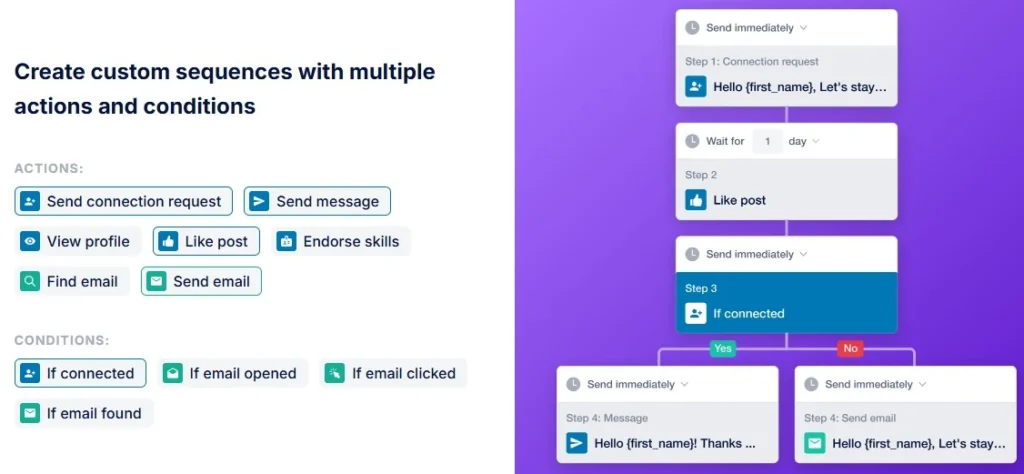
Whether you’re a sales rep, recruiter, or growth marketer, this tool automates tasks like sending connection requests, personalized messages, profile views, and even email outreach—all from one intuitive dashboard.
Why you should have it;
Find and connect with targeted leads: Closely enables you to search for and connect with LinkedIn profiles that match your ideal customer profile using sales navigator search.
Send personalized messages: You can create and automate personalized connection requests and follow-up messages to engage with your target audience.
Engage with posts and profiles: Closely can automate profile views and post engagements to increase your visibility and build relationships.
Manage campaigns efficiently: The tool helps you organize and manage your LinkedIn outreach campaigns, track performance, and optimize your strategy.
Essentially, Closely acts as your LinkedIn assistant, helping you to scale your outreach efforts without spending countless hours on manual tasks.
Why You Should Use A LinkedIn Automation Tool Like Closely?
Closely offers a range of benefits for sales and marketing professionals looking to enhance their LinkedIn presence and drive better results:
Save Time and Increase Efficiency: Automate repetitive tasks like sending connection requests and messages, freeing up your time to focus on more strategic activities.
Generate More Leads: By automating outreach to targeted prospects, Closely helps you expand your network and generate a consistent flow of leads.
Improve Engagement and Response Rates: Personalized messages and automated engagement can lead to higher connection acceptance and response rates compared to generic outreach.
Enhance LinkedIn Presence: Consistent profile views and post engagement increase your visibility within your network and the LinkedIn ecosystem.
Track and Optimize Campaigns: Closely provides analytics and reporting features to monitor campaign performance, identify what works best, and refine your approach for optimal results.
Integration with CRM and Other Tools: Closely integrates with popular CRM systems and other sales and marketing tools, streamlining your workflow and data management.
Closely vs. Competitors: A Quick Comparison
While Closely is a strong contender in the LinkedIn automation space, it’s helpful to see how it compares to some of its competitors. Here’s a brief overview of a few alternatives:
Feature
Closely
LinkedIn Sales Navigator
Lusha
Apollo.io
Salesloft
Primary Focus
LinkedIn Automation
Sales Intelligence & LinkedIn Platform
Contact Data & Prospecting
Sales Intelligence & Engagement Platform
Sales Engagement & Workflow Automation
LinkedIn Automation
Yes
Strong Features
Limited Automation Capabilities
Limited LinkedIn Automation
Yes, Part of Broader Platform
Lead Generation
Yes, Targeted LinkedIn Lead Generation
Yes, Advanced Search Filters & Lead Lists
Yes, Contact Data Enrichment & Prospecting
Yes, Extensive Database & Prospecting Tools
Yes, Part of Broader Sales Engagement Suite
Personalization
Yes, Advanced Personalization Options
Basic Personalization
Basic Personalization
Advanced Personalization Features
Advanced Personalization Features
CRM Integration
Yes
Yes
Yes
Yes
Yes
Pricing
Competitive, Multiple Plans
Higher Price Point
Pay-as-you-go or Subscription
Enterprise-focused Pricing
Enterprise-focused Pricing
Please Note: This is a simplified comparison. Each tool offers a wide range of features and functionalities, and the best choice depends on your specific needs and priorities.
Key Takeaways from the Comparison:
Closely excels in LinkedIn Automation: If your primary goal is focused and effective LinkedIn outreach automation, Closely offers a robust and dedicated solution.
LinkedIn Sales Navigator is a broader sales intelligence platform: While offering some LinkedIn features, Sales Navigator is more focused on sales intelligence and provides advanced search and insights within LinkedIn itself, but less automation.
Lusha and Apollo.io are strong for contact data: These tools are excellent for enriching contact data and providing broader prospecting capabilities beyond just LinkedIn.
Salesloft is an enterprise-grade sales engagement platform: Salesloft offers a comprehensive sales engagement suite, including LinkedIn automation as part of a larger platform, geared towards larger sales teams with complex workflows.
Closely’s Strengths:
Dedicated LinkedIn Automation: Closely’s core focus is LinkedIn automation, making it highly specialized and feature-rich in this area.
User-Friendly Interface: Closely is known for its intuitive and easy-to-use interface, making it accessible for users of all technical levels.
Affordable Pricing: Compared to some broader sales engagement platforms, Closely offers competitive and flexible pricing plans, making it accessible for smaller businesses and individual professionals.
Who is Closely For?
Closely is ideally suited for individuals and businesses seeking a specialized and efficient solution for LinkedIn outreach automation. Its strong suite of features, user-friendly interface, and affordable pricing make it particularly attractive for smaller businesses and professionals looking to enhance their marketing efforts on LinkedIn. If optimizing your LinkedIn automation strategy is your priority, Closely stands out as a top choice. Closely is particularly well-suited for:
Sales Professionals: Sales representatives, business development managers, and sales leaders looking to generate leads (or lead management), connect with prospects, and nurture relationships on LinkedIn.
Marketing Experts: Marketing professionals focused on LinkedIn for content distribution, brand building, and engaging with potential customers.
Small to Medium-Sized Businesses (SMBs): Businesses looking for a cost-effective and efficient way to scale their LinkedIn outreach and lead generation efforts.
Agencies: Marketing and sales agencies managing LinkedIn outreach campaigns for their clients.
Integrations and Automation Features for Enhanced Outreach
Closely enhances your workflow by offering seamless integration with widely-used CRMs and tools. It supports a range of systems, including HubSpot CRM, Zoho CRM, Salesforce, and Pipedrive, facilitating direct management of leads and campaigns within these platforms for a streamlined process.
By connecting Closely to your chosen CRM with just a few clicks, you’ll be able to handle LinkedIn automation straight from the comfort of your CRM dashboard. This connection not only saves time, but also optimizes outreach efforts efficiently. With Closely as your LinkedIn outbound platform, you can efficiently manage your lead generation process while benefiting from advanced analytics. This allows you to track campaign performance, refine strategies, and make data-driven decisions that boost your outreach efficiency.
The platform’s multi-channel capabilities also enable you to run simultaneous campaigns, whether on LinkedIn or via email, giving you the flexibility to optimize your outreach efforts across different channels while maintaining a cohesive LinkedIn outbound platform strategy.
Searchıng for the best Way to automate your workflow?
dıscover aı agents, supercharge your marketıng efforts
Consider signing up for a free trial (if available) or requesting a demo to experience the power of Closely firsthand.
Conclusion
The future of B2B sales is increasingly digital, and LinkedIn remains at the forefront of professional networking. With tools like Closely, you can stay ahead of the curve while maintaining authentic connections with your prospects. Whether you’re just starting with LinkedIn automation or looking to upgrade your current process, Closely offers the features and support needed to succeed in modern B2B sales. The platform’s commitment to security, combined with its powerful automation capabilities, makes it a valuable tool for anyone serious about scaling their LinkedIn outreach.
Remember, successful B2B sales isn’t just about reaching more people – it’s about reaching the right people with the right message at the right time. Closely helps you achieve exactly that, while saving you countless hours in the process.
Have you tried LinkedIn automation tools before? What are your experiences? Share your thoughts and questions in the comments below!
Find out the best ecommerce platforms that are expected to lead in 2025.
Choose the right platform for your business, whether you are just starting out or running a big company.
Look at important features, pricing options, and key points to think about when you decide.
Get advice on moving to a new ecommerce platform easily and read inspiring success stories.
Table of Contents
Introduction
There are over 26 million e-commerce sites around the world. Choosing the right platform is very important for your success. This number is huge, isn’t it? With so many choices, it’s normal to feel confused. But don’t stress—you are in the right spot. I will explain the best e-commerce platforms. This way, you can find the best fit for your online business.
What Are E-Commerce Platforms & Why Do They Matter?
An e-commerce platform is software that helps you create, launch, and run your online store. It acts as the digital base for your business. Here, you can display products, manage payments, and take care of things like inventory and shipping. Picking the right platform is important. It affects how well your store performs, the customer experience, and, in the end, your sales.
Think about this: 87% of shoppers start looking for products online. If your website is slow or hard to use, you might lose customers. However, if you choose the right platform, you can make a smooth shopping experience. This will help keep visitors coming back. Now, let’s look at the platforms that are always the best.
Best E-Commerce Platforms of 2025
There are several differences in ecommerce features. But don’t worry, you can compare them easily.
Shopify
I have seen many entrepreneurs succeed with Shopify. They often move quickly from having an idea to making real sales. Shopify is one of the easiest and most flexible e-commerce platforms available today. It has a wide range of features and a large app store. This makes it a great option for businesses of any size.
Features:
A store builder that allows you to easily drag and drop items
Payment processing is simple with Shopify Payments
A large marketplace for various apps
Strong tools for managing your inventory
The ability to sell on multiple channels
Pros:
A very easy-to-use interface
Customer support available all the time
A wide range of themes to choose from
Good security features
Regular updates to the platform
Cons:
You will have transaction fees if you do not use Shopify Payments.
Advanced features cost more and need higher-priced plans.
Customization is limited unless you know how to code.
WooCommerce
You know that great feeling when you find something that fits just right? I felt that way when I first tried WooCommerce. It has so many options for customizing. I love playing around with websites, and WooCommerce is like a huge Lego set. You can create almost anything as long as you learn how the parts work together.
WooCommerce is a popular choice for WordPress users who want to add e-commerce features to their websites. This open-source platform gives you great flexibility. You can control how your online store works and looks.
Features:
Total integration with WordPress
Endless customization possibilities
A wide range of plugins available
A solution that you host yourself
Many different payment options
Pros:
You can install and use it for free.
You have full control over your store.
There is a large community that supports you.
The structure is good for SEO.
You can have unlimited products and variations.
Cons:
You need WordPress hosting.
You must have some technical knowledge to set it up.
You are responsible for maintaining security.
It can get expensive if you use premium extensions.
A good choice for: WordPress fans who like flexibility and are okay with dealing with some technical details.
BigCommerce
BigCommerce is known as a strong platform. It can easily manage complicated online store tasks. It has top features and can grow with businesses. This makes it a great choice for companies that want to build their online presence.
Features:
Built-in SEO Tools
Support for many currencies
Advanced product filtering
Recovery for abandoned carts
Features for B2B
Pros:
No fees for transactions
Great site speed
Advanced features built in
Strong capabilities across multiple channels
Strong API
Cons:
A more difficult learning process
Yearly sales limits for each plan
A higher initial price
Fewer free themes
Great for businesses that are growing. These businesses need advanced features and people who are willing to spend time learning the platform.
Wix eCommerce
I love seeing the excitement in people’s eyes when I show them Wix eCommerce. They quickly understand that they can build what they imagine without needing to write any code. Wix eCommerce is easy to use and offers strong features. This makes it a favorite for small business owners and entrepreneurs. The platform has simple design tools and helpful built-in features. This allows new users to create great-looking online stores fast.
Features:
A great choice of templates
An easy drag-and-drop editor
Marketing tools included
A program for customer loyalty
Automated sales tax handling
Pros:
A real editor where what you see is what you get
No need for coding
Comes with email marketing included
Options to customize products
Editor that works on mobile
Cons:
There are few ways to migrate.
You cannot change templates after you publish.
Some advanced features are not included.
It is not as scalable as other choices.
Ideal for: Those new to design and creative people who value flexibility in design and find it easy to use.
Squarespace Commerce
Here’s a platform that always makes me happy when I help someone use it – the designs are beautiful! Squarespace Commerce is great for creating eye-catching online stores without much work. The platform focuses on style and beauty, which makes it especially attractive to creative professionals and brands that care about how things look.
Features:
Templates that have won awards
Image editing tools included
Email campaigns that are built-in
Connect with social media
System for Point of Sale
Pros:
Great design options
All-in-one pricing
Powerful blogging tools
Mobile-friendly checkout
Professional email provided
Cons:
A few payment options available
Fewer outside tool connections
Simple inventory management
Some features require more expensive plans
Ideal for: Businesses that focus on design, value good looks, and want a complete solution.
Magento (Adobe Commerce)
Magento is a top-level e-commerce platform. It gives you a lot of options to customize and expand your store. It is like the heavyweight champion of e-commerce. At first, it may feel a bit overwhelming, but the capabilities it has are truly amazing.
Features:
Better B2B functions
Ability to scale globally
Management of complex catalogs
Merchandising powered by AI
Strong security features
Pros:
Very customizable
Manages big inventories
Great features for multiple stores
Detailed reporting
Enterprise-level security
Cons:
A lot of money needed
Skills in technology required
Complicated to put in place
Needs many resources for hosting
Ideal for: Large enterprises that have complex needs and the resources to support a more advanced platform.
Square Online
Square Online connects physical stores and online shopping easily. The way it works with Square’s point-of-sale system makes it a great choice for regular stores that want to start selling online.
Features:
There is a free plan available.
It has an integrated POS system.
You can sync inventory in real-time.
There are built-in options for delivery.
It also integrates with Instagram.
Pros:
Simple to use
Smooth offline and online connection
Affordable transaction fees
Fast setup process
Free SSL certificate
Cons:
Not much customization
Simple design choices
Only square payments
Few international options
Brick-and-mortar businesses
Big Cartel
This platform is like an art gallery that became an online store. It is simple, stylish, and focuses on your work. Big Cartel is for independent artists and makers. It offers a basic and easy way to sell online. Its simple features and friendly prices make it a great option for creative people who want to start their business.
Features:
A free plan for basic needs
Support for custom domains
Stats that update in real-time
Tracking of inventory
Ability to create discount codes
Pros:
Prices that artists will like
Easy to use
No fees for transactions
Order management included
A clear, simple design
Cons:
Fewer features than other products
Simple customization options
A cap on products, even in paid plans
Basic tools for reporting
Key Features to Consider When Choosing the Best Ecommerce Platform
Picking the best e-commerce platform is like picking a business partner. It should grow with you, handle challenges, and simplify your life. Here’s what to focus on:
Scalability
Your platform should evolve as you do. Find pricing options that fit your needs. Make sure it has a strong app ecosystem. It should manage increases in traffic or inventory well.
A flexible solution means you won’t have to deal with major changes later. Instead, you can enjoy steady and confident growth.
Security
No compromises are allowed. SSL certificates, PCI compliance, and two-factor authentication are a must. Protecting customer data is very important to build trust and avoid legal issues.
User Experience (UX)
Shoppers like things to be easy. Focus on making designs friendly for mobile users, offer one-click checkouts, and ensure navigation is simple. It’s also a plus to have guest checkout options. The fewer challenges there are, the more people will buy.
SEO & Marketing Tools
Your ecommerce platform should have strong SEO tools and good marketing features. This helps you attract attention and increase traffic. Find platforms that let you enhance product pages for search engines. They should also allow you to manage meta descriptions and create quality content to improve your ranking. Some important SEO and marketing tools to consider are:
SEO-friendly URL structure: This keeps your URLs clean. It helps them show up better online.
Blog integration: This lets you make helpful content. It keeps your target audience interested.
Social media integration: This makes it easy to share products and updates on social media.
Email marketing tools: These are good for building email lists. They help you run focused marketing campaigns.
Discount and coupon codes: This helps you offer promotions. It attracts and encourages customers.
Integration Capabilities
Choose a platform that has many apps or open APIs. This allows you to connect your ecommerce work with the tools you already use. When data moves easily between your ecommerce platform and these tools, it saves you time and effort. It also helps you gain insights that lead to better choices.
Differences between the Cost Implications of Ecommerce Platforms
When you put money into a good ecommerce platform, it can help you do well online. It’s key to check the prices of different choices to make sure they match your budget and business needs. Besides the setup costs at the start, think about the ongoing costs like monthly subscription fees and transaction fees. Also, look at any extra costs for additional features or upgrades.
Knowing the pricing details and any extra fees helps you pick an ecommerce platform with great features. This choice keeps your costs down. In this way, you will get the best value from your investment.
Learn About the Pricing Models
Ecommerce platforms often use different pricing models. Each model has its own advantages and considerations for businesses. Knowing about the common pricing structures can help you make better choices when looking at different options.
Let’s break down a few prevailing pricing models:
Pricing Model
Description
Considerations
Transaction Fees
This model involves charging a percentage or fixed fee per transaction processed through the platform.
Ideal for businesses with lower sales volumes, as costs scale with transactions. However, higher sales volumes might lead to increased expenses.
Subscription Fees
Platforms employing this model charge recurring monthly or annual fees for access to features and services.
Offers predictability in expenses, making it suitable for businesses with consistent sales. However, costs remain fixed regardless of sales fluctuations, potentially impacting profitability.
Tiered Pricing
This model provides different pricing tiers with varying features and resources. As businesses grow, they can upgrade to higher tiers for enhanced capabilities.
Offers flexibility as businesses can choose tiers aligned with their needs and budget. However, transitioning between tiers might involve adjustments in features and costs.
Freemium
These platforms offer a basic free plan with limited features, while premium features or enhanced functionality require paid subscriptions.
A cost-effective starting point for small businesses or testing the platform before committing to paid plans. However, limited features in free plans might necessitate upgrading as the business grows.
Custom Pricing
Some platforms offer tailored pricing based on specific business needs, size, and requirements.
Provides flexibility and personalized pricing tailored to unique needs. However, negotiating custom pricing might require time and effort, and transparency in cost breakdowns is essential.
Hidden Costs to Watch Out For
When you check out ecommerce platforms, be aware of hidden costs. These extra fees are often overlooked at first. However, they can grow and hurt your profits in the long run.
Make sure to ask about the transaction fees from the payment gateways linked with the platform. These fees can differ from one to another. Also, check for any costs tied to add-ons, integrations, premium themes, or third-party apps that you may need for the features you want. Some platforms might also have limits on bandwidth or storage. If you exceed these limits, it could lead to additional costs.
If you spend time to learn about the total cost of different ecommerce platforms, you can choose what works best for your budget and your business needs.
Common Mistakes & Best Practices
Mistakes to Avoid:
Paying too much for features that you do not use.
Forgetting about scalability—what works well now may hold you back in the future.
Not focusing on mobile optimization (60% of online shopping happens on mobile devices).
Best Practices:
Put user experience first: A tidy design, simple navigation, and quick loading times are important.
Use platform tools: Think about email marketing, social media, and inventory tools.
Emphasize mobile: A responsive design is a must.
Final Thoughts
The best platform for you does not need to have all the features. It just needs to have the features that fit your business well. Start today. Don’t worry about being small at first. You can grow and add more later.
Do you wanna start wıth e-commerce?
Read our blog on How to start your Onlıne Busıness
Choosing the right e-commerce platform depends on what your business needs. Some well-known e-commerce platforms you might think about include Shopify, WooCommerce, BigCommerce, Magento, and Wix. Each platform offers different strengths and features. It’s key to look at factors like ease of use, customization options, scalability, pricing, and how well they work with other tools or services. Take time to research each platform. This will help you find the one that fits your e-commerce goals best.
How much does it cost to build an ecommerce website?
The cost to build an ecommerce website can change based on several points. These include how complex the site is, the features you want, design choices, and if you use a website builder or hire a web developer. Usually, a simple ecommerce website costs between a few hundred dollars and several thousand dollars. If you want a more complex or custom-built ecommerce site, prices can start at several thousand dollars and go up to tens of thousands or more. It is a good idea to list your needs and budget before starting. This will help you understand the costs better.
This blog is the best resource for learning how to build AI agents for beginners.
You can explore how to use AI for customer support and as e-commerce helpers.
We make developing AI agents easy with a simple step-by-step guide, so anyone can do it.
Find out about the future of automation with AI software like Make and N8N.
Learn how to test, launch, and keep track of your own AI agent!
The Quiet Revolution of AI Agents in Modern Marketing
In 2023, marketers worldwide faced a paradox: while 64% adopted AI tools, only a fraction unlocked the full potential of AI —autonomous systems that don’t just assist but think and act; the AI agents. Fast-forward to 2025, and the landscape has shifted. Startups, freelancers, online business and even local businesses are leveraging AI agents to automate complex workflows, predict customer behavior, and craft strategies that outpace competitors.
What Are AI Agents?
AI agents are autonomous programs that analyze data, learn patterns, and execute tasks without constant human input. Unlike basic chatbots or scripted tools, they adapt.
These agents can be simple, like a chatbot that answers questions from customers. They can also be complex, like a system that runs an entire factory floor. The secret to their success is their ability to see their surroundings, learn from data, and make choices to get the results you want.
According to a 2024 Gartner report, businesses using AI agents reduced operational costs by 35% and improved campaign ROI by 40%. The key difference? These agents learn. They use machine learning (ML) models to refine their decisions, making them invaluable for tasks like ad optimization or lead scoring.
Different Types of AI Agents
Now, just like there are different tools for different jobs, AI agents also come in many types, each with its own advantages. Let’s look at a few:
Simple reflex agents are the rule-followers. They do well in situations with clear patterns and react to certain triggers using pre-set instructions. For example, think of a chatbot that gives quick answers based on the keywords in your questions—that’s a simple reflex agent working!
Next, we have model-based reflex agents. These smart agents create an internal model of their surroundings. They use their knowledge to make better choices, even when things don’t go as expected. They are like master strategists, always planning a few steps ahead!
Finally, the most flexible type is the learning agents. As their name suggests, they learn and grow from experience. Imagine an AI system that gets better at suggesting products the more you use it—that’s the learning agents for you.
How to Build Your Own AI Agent?
With today’s technology, you don’t need to be a coding expert to learn to build your first AI agent. The first step is to define your goals. What do you want your AI agent to accomplish Once you know what you want, you can begin collecting the data your AI needs to learn and grow. This is like giving your AI agent the information it needs to become skilled in the area you choose.
Building an AI agent might sound daunting, but with no-code platforms, it’s akin to assembling IKEA furniture—follow the instructions, and it works. Here’s how:
Let Me Introduce Make and n8n
Imagine you have a box of LEGO blocks. Each block can do one thing: send an email, check Instagram, or talk to ChatGPT. Make.com and n8n.io let you snap these blocks together to build a robot (your AI agent) that does tasks automatically.
For example:
LEGO Block 1: “Check Gmail for new emails.”
LEGO Block 2: “If the email says ‘urgent,’ send a Slack alert.”
LEGO Block 3: “If not, reply with a thank-you message using ChatGPT.”
That’s it! No coding—just connecting blocks.
Why Make.com and n8n.io?
No-Code Flexibility: Drag-and-drop interfaces to create workflows (called scenarios in Make.com or workflows in n8n.io).
AI Integration: Connect OpenAI, Claude, DeepSeek or custom models to analyze data, generate content, or make decisions.
Cost-Effective: Free tiers available (Make.com offers 1,000 operations/month; n8n.io is open-source and self-hostable).
How These AI Tools Work (3 Simple Steps)
1. Pick a Trigger: What starts the automation?
Example: “When someone fills out my Google Form…”
2. Add an Action: What should happen next?
Example: “…send their info to ChatGPT to check if they’re a good lead.”
3. Decide the Outcome: What’s the final step?
Example: “…if they’re a good lead, add them to HubSpot. If not, send a follow-up email.”
Let’s Build Your First AI Agent (With Examples)
Example 1: Instagram Comment Responder
Goal: Automatically reply to comments on your posts.
Tools: Make.com + ChatGPT.
Steps:
Trigger: Select “New comment on Instagram” in Make.com.
Action: Connect to ChatGPT and ask: “Write a friendly reply to this comment: [Comment Text].”
Result: Post the ChatGPT reply back to Instagram.
Why It’s Cool: Saves 10+ hours/month.
Example 2: Lead Qualifier for Small Businesses
Goal: Automatically sort leads from a Google Form.
Tools: n8n.io + Google Forms.
Steps:
Trigger: Select “New Google Form response” in n8n.io.
Action: Send the response to ChatGPT and ask: “Is this person from a company with 50+ employees?”
Result:
If Yes → Add to your CRM (like HubSpot).
If No → Send a “Thanks for applying!” email.
Why It’s Cool: No more manual data entry!
Make.com vs. n8n.io: Which Should You Use?
Example 1: Build a Social Media Monitoring Agent with Make
Goal: Automatically track brand mentions, analyze sentiment, and alert your team.
Steps:
Trigger: Set up a trigger to scan Twitter/X for mentions of your brand (using Make.com’s Twitter module).
AI Analysis: Route mentions to OpenAI’s API to assess sentiment (positive, negative, neutral).
Action:
Send negative sentiment alerts to Slack.
Auto-reply to positive mentions with a thank-you message.
Result: A bakery used this agent to catch complaints about delayed deliveries in real time, improving response speed by 90%.
Example 2: Create a Lead Qualification Agent with n8n
Goal: Automatically score leads from a Google Form and add qualified ones to a CRM.
Steps:
Trigger: New Google Form entry (e.g., “Request a Demo”).
AI Processing: Use n8n.io’s Code Node to send lead data to OpenAI:
Ask ChatGPT: “Is this lead from a B2B company with 50+ employees?”
Decision:
If “Yes,” add to HubSpot CRM.
If “No,” send a nurturing email sequence.
Result: A SaaS startup automated 80% of lead screening, saving 15 hours/week.
Key Features of Make.com vs. n8n.io
Feature
Make
n8n
Pricing
Free tier (1K ops/month); paid from $9/month.
Free open-source; cloud plans from $20/month.
AI Integrations
OpenAI, Google AI, pre-built modules.
Supports any API (OpenAI, Claude, custom).
Ease of Use
Visual, beginner-friendly.
More flexible but steeper learning curve.
Best For
Quick automations with templates.
Complex workflows with custom logic.
Why These Tools Beat Traditional Coding
Speed: Build a functional AI agent in 1 hour vs. weeks of coding.
Scalability: Start free, then upgrade as your needs grow.
Community Support: Reddit’s r/nocode and Make.com’s template library offer plug-and-play solutions.
Pro Tip: Use n8n.io’s HTTP Request node to connect niche tools like Lemlist or Airtable that aren’t natively supported.
How To Get AI To Plan A Marketing Strategy
AI agents don’t just execute tasks—they strategize. AI marketing automation is here and the minute you’re not using it, you fall behind. Here’s how to turn data into actionable plans:
Phase 1: Data Aggregation
Pull data from Google Analytics, CRM systems, and social platforms.
Tools like Airtable or Notion AI can centralize this data. (This is especially very useful for b2b ai marketing solutions)
Phase 2: Pattern Recognition
AI tools like Jasper or Copy.ai analyze data to uncover trends. For example:
“Video content drives 2x more engagement for B2C brands on TikTok.”
“Email campaigns sent at 10 AM on Tuesdays have a 30% higher open rate.”
Phase 3: Strategy Generation
Platforms like ChatGPT-4 can draft a full marketing plan. Input prompts like:
“Create a Q4 marketing strategy for a vegan skincare brand targeting millennials.”
“Allocate a $10,000 budget across Facebook Ads, influencer partnerships, and SEO.”
Real-World Example: A DTC jewelry brand used an AI agent to analyze 1,000+ Instagram posts, identify trending designs, and launch a collection that sold out in 48 hours.
Free Tools to Build AI Agents (Without a Tech Team)
After all this information, I hear you asking “How to create free AI agents tho?”. Other than paid tools, you always have options to use free software;
For Chatbots:
Google’s Dialogflow: Free tier includes 15,000 monthly requests. Perfect for small businesses.
Botpress: Open-source, with pre-built templates for industries like healthcare or e-commerce.
For Predictive Analytics:
Hugging Face: Access free ML models for sentiment analysis or trend prediction.
RapidMiner: A free plan for data mining and predictive modeling (limited to 10,000 rows).
For Workflow Automation:
Zapier’s ChatGPT Integration: Connect AI to 5,000+ apps. Example: “Auto-generate blog ideas from trending Reddit threads.”
Cost-Saving Insight: A 2024 TechCrunch survey found that 68% of solopreneurs use free AI tools to replace $500/month SaaS subscriptions.
Case Study: How a B2B Startup Scaled with an AI Agent
The Challenge: A fintech startup struggled to identify decision-makers in Fortune 500 companies. Manual LinkedIn searches took 20+ hours weekly.
The Solution:
Built a Phantombuster agent to scrape LinkedIn for titles like “CFO” or “Head of Procurement.”
Integrated with HubSpot to auto-send personalized connection requests.
Added a GPT-4 layer to customize pitches based on the prospect’s industry.
The Result: 500+ qualified leads/month with a 15% response rate. Reduced manual work by 80%, freeing the team to focus on closing deals.
Common Pitfalls (And How to Avoid Them)
Mistake 1: Overambition
A Reddit user shared how their first agent—designed to handle “all social media, emails, and ads”—crashed within days.
Fix: Start with one task (e.g., “auto-reply to Instagram DMs”).
Mistake 2: Ignoring Data Bias
An e-commerce brand trained its agent on skewed data (mostly male buyers), leading to poor recommendations for female customers.
Fix: Use diverse datasets and tools like IBM’s AI Fairness 360 to detect bias.
Mistake 3: Neglecting Maintenance
AI agents degrade over time. A travel agency’s chatbot failed to recognize post-pandemic travel trends like “workations.”
Fix: Schedule monthly updates to retrain models with fresh data.
Conclusion: The Future Belongs to AI-Augmented Marketers
The growth of AI agents boosts human creativity by automating tasks, finding insights, and improving strategies. With Make.com and n8n.io, building AI agents isn’t a distant dream—it’s a weekend project. Automate lead gen, social listening, or content planning without writing a single line of code.
FAQ
Can AI agents replace human marketers?
No—they’re force multipliers. While agents handle grunt work, humans strategize and innovate.
What’s the cheapest way to start with AI agents?
Combine Zapier’s free plan with ChatGPT to automate tasks like social media scheduling.
Find out core and advanced online marketing strategies to boost brand visibility.
Learn how personalization, automation, and email campaigns can enhance your digital marketing strategy.
Explore SEO strategies, Google Ads, and paid advertising campaigns to increase your online presence.
Gain insights into content marketing, social media, and influencer marketing to expand your reach.
Understand the significance of Google Analytics and data analysis for refining your marketing efforts and measuring the success of your strategy.
Introduction
As we get closer to 2025, having a strong online presence is not just an option anymore; it’s a must! For businesses to do well in this lively environment, they must use smart online marketing strategies. A good digital marketing plan helps your marketing team reach more people, connect with potential customers, and grow your business. It is important for both small startups and large companies to use digital marketing to stay competitive.
Today, consumers are smart with technology. They are informed and want a smooth experience on all digital platforms. To keep up with these changes, businesses must focus on customer experience and connect with their target audience where they are. Sharing valuable content, interacting on social media, and being active on many digital channels are crucial now more than ever.
When you understand what consumers need and focus on a good user experience, you can create stronger connections and build brand loyalty over time.
Core Marketing Strategies
Before we start with advanced tactics, let’s build a strong base with the best online marketing strategies. These strategies will help you create a strong online presence and prepare you for success in the digital world.
By focusing on these core strategies, you can adjust your marketing efforts to connect with your target audience and encourage real engagement.
Personalization in Marketing
Personalization is more than just using their first names. It means knowing your buyer persona, which includes their age, interests, problems, and online habits. By using data analytics and automation tools, you can adapt your messages, content, and offers. This helps to create a better and more engaging experience for each customer.
There are many ways to use personalization well, like sending personalized emails and changing website content. Just remember, a bit of personalization can really help you build better relationships with customers and boost sales.
Automation and AI Integration
Imagine making your marketing easier and better without doing much work. This is what automation and AI can do for you! With marketing automation tools, you can set up tasks that happen on their own. This includes sending emails, posting on social media, and nurturing leads.
AI takes this even further. It looks at your data and gives you smart tips to enhance your campaigns in real time. For example, AI chatbots can help answer questions, give support, and suggest solutions any time of day.
Using automation and AI in your marketing plan saves you time and effort. It also helps you create more personalized experiences for your target audience.
Omnichannel Marketing Approach
So you know how back in the day, businesses would just stick to one or two ways to reach their audience? Well, in 2025 and beyond, it’s all about having an omnichannel marketing strategy. Basically, this means you gotta spread your marketing efforts across all digital platforms to ensure a seamless experience for your customers.
Omnichannel marketing is all about tying together your marketing efforts across various digital platforms like your website, social media, email campaigns, and even face-to-face meetings. This approach keeps your brand message consistent and ensures that your audience feels like they’re getting a personalized experience, no matter how they interact with your business.
Advanced Marketing Tactics
Now that we have the basics in place, let’s look at some advanced marketing techniques. These methods improve on the main strategies. They help you connect with your target audience in more engaging ways. By adding these advanced techniques to your marketing plan, you can stand out and make a stronger impact online.
Email Marketing
Don’t overlook how strong email marketing can be! Creating an email list is still one of the best ways to help leads, boost sales, and stay connected with your target audience.
When you share valuable content, special offers, and personalized messages, you can create good relationships with your subscribers and keep them interested. Here are some key email marketing tips:
Segment Your Email List: Split your subscribers into groups based on their interests and behaviors. This way, you can send them more targeted and relevant content.
Craft Engaging Content: Give value to your subscribers by sharing useful blog posts, fun promotions, and attention-grabbing visuals.
Optimize for Conversions: Make sure to include clear actions in your emails. This will help guide your readers to take steps like buying something or visiting your website.
Paid Advertising (SEA)
Paid advertising, especially Search Engine Advertising (SEA), is a strong part of online marketing strategies. Using platforms like Google Ads, businesses can choose specific keywords to show their ads in search results. This helps them get seen by potential customers who are looking for related products or services. To use SEA well, it is important to know your target audience and pick the right keywords to make the most money from your investment. SEA can also support other marketing efforts. It is key for improving brand visibility and bringing relevant traffic to your website.
SEO & Content Marketing
Are you ready to bring more organic traffic to your website? You need a good SEO and content marketing strategy! Search Engine Optimization (SEO) helps improve your website and content to rank better in search engine results pages (SERPs).
You can make your website an expert source in your field by making useful, relevant, and consistent content like blog posts, articles, and videos. When your content ranks well, it draws in potential customers who are looking for information about your products or services.
Having a strong SEO strategy and regularly creating top-quality content is key for lasting online presence and steady growth. And now, with the help of AI, you’re closer to get ranked quickly. Check out how Harpa.AI can be your ultimate AI assistant!
You can also use RankMath to support your content. For more information, make sure to read our detailed article on RankMath SEO Plug-in!
Social Media Strategies
Social media marketing changes often. It is important to use social media channels to connect with your target audience. This can help your brand reach more people.
The first step is to find the right social media platforms where your target audience is active. Create engaging social media posts and share content that looks good. Interact with your followers often.
You might also want to work with influencers in your industry. This can help you reach their audience and build trust for your brand.
Interactive and Gamified Content
In a world full of content, getting and keeping your audience’s attention needs creativity and fresh ideas. Adding interactive and gamified content to your digital marketing plan can really boost user engagement and make your brand stand out.
Interactive content gets users to take part actively, turning them from passive viewers into engaged fans. Things like quizzes, polls, and interactive infographics give helpful information while also entertaining your audience.
Gamification goes further by adding game-like features like challenges, rewards, and leaderboards to your marketing campaigns. When you make interactions fun and rewarding, you can build loyalty and encourage people to come back to your website or social media channels.
Where to demonstrate your marketing strategıes?
Check out HOW YOU CAN START YOUR OWN ONLINE BUSINESS TODAY
Step-by-Step Guide to Implementing Online Marketing Strategies
Here are some steps to help you carry out best online marketing strategies and set your brand up for success. If you follow a clear plan, you can build a strong digital marketing strategy that fits with your business goals.
Step 1: Build a Strong Online Presence
To build a strong online presence, begin by making an attractive website that shows who you are as a brand. Use social media to connect with people and bring them to your site. Keep posting helpful content on both social media and your blog. This will make your brand easier to find. Use SEO strategies to help your website rank better in search engines. When you improve user experience and offer relevant content, you can draw in and keep visitors. This will set a good base for successful online marketing efforts.
Step 2: Engaging Content Creation and Curation
Content is very important online. To attract and engage your target audience, you must create high-quality content that meets their interests and needs.
Make a content plan that includes blog posts, articles, videos, infographics, and other formats your audience likes. Focus on their pain points, answer common questions, and share valuable content.
It is also important to be consistent. Set a regular schedule for publishing content to keep your audience interested and show that you want to provide value.
Step 3: Optimization for Search Engines (SEO)
To improve how people find you online, focus on SEO. This will help your website rank better. Start by researching keywords that match what users are searching for. Optimize your meta tags and write good meta descriptions. Create quality content that includes the right keywords. This will build your site’s authority and trust. Use internal links to make navigation easier for users. Also, make sure your site works well on mobile devices for a smooth browsing experience. Keep up with SEO updates to stay on top of search engine rankings.
Step 4: Leverage Social Media for Brand Visibility
Social media is now a strong tool for promoting your brand. It helps you connect with your target audience and can even boost sales.
Start by creating social media accounts that show off your brand. Share interesting content, talk with your followers, hold fun polls and contests, and join in talks related to your industry.
Use social media ads to reach more people and focus on groups with specific interests. When you use social media well, it can raise your brand awareness, link you with your target audience, and help your marketing campaigns be more successful.
Step 5: Email Marketing Tactics for Direct Engagement
Segmented email marketing is a key way to connect directly with your audience. You should create personal messages that fit your subscribers. This helps them engage more with your brand. Use automation tools to plan your emails effectively. This way, you can send messages that are timely and relevant. Make sure to use interesting subject lines and strong content to get more people to open and click your emails. You can check email data like open rates and conversion rates. This helps you improve your email marketing for better results. Always listen to feedback and keep updating your email strategies for better engagement.
Step 6: Analyzing Data for Improved Strategies
Use analytics tools like Google Analytics to see how well your top online marketing strategies are doing. Looking at data helps you find out what works and what needs changes. By checking metrics like conversion rates, engagement, and where your website traffic comes from, you can improve your methods for better outcomes. Insights from the data help you make smart choices and adjust your strategies to connect better with your target audience. Always review and use data to keep improving your marketing efforts.
Always Measure Success in Online Marketing
It is not enough just to use strategies, you also need to check how well they work. This helps you know if you are moving in the right direction. Looking at the success of your digital marketing campaigns is important to reach your business goals and grow over time.
Key Performance Indicators (KPIs) to Watch
Monitoring key performance indicators (KPIs) is very important for seeing how well your online marketing is doing. Some key KPIs to look at include website traffic, conversion rates, click-through rates, and engagement metrics. By checking these numbers often, you can learn a lot about how well your strategies work. This helps you make smarter choices to improve your campaigns. Remember, KPIs are vital for checking how your digital marketing is performing and making sure you meet your business goals. Be proactive in watching and changing your strategies based on these key metrics.
Utilize Analytics for Strategy Refinement
The great thing about digital marketing is how easy it is to measure. You have a lot of data right at your fingertips! You can use tools like Google Analytics to understand user behavior, see how well your campaigns are doing, and collect important data to shape your strategy.
Analyzing data helps you spot trends, patterns, and new chances. This way, you can improve your campaigns and use your resources better. For example, if you see a social media campaign getting a lot of engagement, you might want to try something similar to keep that success going.
Analytics gives you the power to make decisions based on facts. It helps you refine your strategies year after year and keeps your marketing efforts aligned with your business goals.
Conclusion
It is very important to understand online marketing strategies for your business to succeed. You should focus on personalization, automation, and using many channels to connect with and keep customers. Using advanced methods, like email marketing, social media, and SEO, can help your brand be seen more often. By having a strong online presence and looking at data to improve, businesses can find real success. It is essential to stay updated with new trends to stay ahead in digital marketing in 2025. Use these strategies to make customer experiences better and help your online growth. Let’s work together on this exciting journey towards being great in digital marketing!
Frequently Asked Questions
What is the best strategy for online marketing?
The best marketing strategies change based on your target audience and goals. They often use a mix of methods. These methods include SEO, content marketing, social media marketing, and paid ads. This mix helps build brand awareness, brings traffic to your website, and rises the conversion rate of your digital marketing campaign.
What are the 4 P’s of online marketing?
The 4 P’s of marketing are product, price, place, and promotion. They are important for online marketing too. You need to think about these key parts when planning your online marketing strategy. This helps you reach your target audience and meet your business goals.
How Do I Keep Up with Changes in Online Marketing Trends?
The world of digital marketing is always changing. This makes it important to keep learning. Stay up-to-date with the latest marketing trends. You can do this by reading industry blogs, joining webinars, and being active in online marketing groups. It helps to have a mindset focused on continuous learning and testing new ideas. This way, you can adjust your strategies and stay ahead of the game.
Starting an online business is easier now, even if you do not have much money, you can easily learn how to start an online business with minimal investment.
Check out simple business models that need little investment, like dropshipping, affiliate marketing, and selling digital products.
Focus on low-cost ways to market. Think about social media marketing, content marketing, and email marketing.
Avoid mistakes like skipping market research or not having a clear brand identity.
Remember that careful planning, a strong business plan, and putting customers first are key to your success.
Introduction
Have you ever wanted to be your own boss and choose your own hours? Starting a successful online business allows you to work from any place and enjoy what you do. The great news is you don’t need a lot of money to get started! With some creativity, planning, and hard work, you can create your own business and build a successful online store. Let’s see how to do it!
5 Reasons You Should Start an Online Business
The reasons to begin an online business are clear. So, why pick this path? First, the chance to earn passive income is really appealing. Just think about making money while you sleep! Online businesses also give you a lot of flexibility and room to grow that you might not find elsewhere. Here are 5 great reasons to get started:
1. Flexibility
Running an online business allows you to work from any location. You can set your own hours, which helps you balance work and life well. You can also take advantage of different time zones to assist customers worldwide and work at times that suit you. This flexibility makes it easier for you to adapt to changes in the market or new trends.
2. Low Start-up Costs
Starting an online business is not like starting a regular business. It requires less money to get going. This makes it a more affordable choice for new entrepreneurs. You can find many free or low-cost tools and resources online. They can help you launch your business without spending too much. This way, you can test different ideas and plans without risking a lot of money.
3. Global Reach
With an online business, you can reach people everywhere in the world, at any time. This helps your customer base grow beyond just your local area. You can use social media and digital marketing to target specific places or groups. This way, you can connect with more people and have a greater impact. A global audience also opens up opportunities to partner with companies in other countries.
4. Scalability
Online businesses can grow fast and expand easily. You can reach more customers without spending too much money or needing a lot of resources. As your business grows, you can use automation and hire others to help make things easier and grow better. This ability to scale up also lets you change your business model or look into new markets when opportunities appear.
5. Diverse Revenue Streams
Through an online business, there are many ways to make money. You can try e-commerce sales, sell digital products, or get into affiliate marketing. Having different income sources will help you not rely on just one. By exploring several ways to earn money and improving them, you can find out which ones give you the best returns. This approach will help you focus on making more money. Plus, with several ways to earn, you can better manage hard economic times or changes in what people want.
Running your own online business helps you connect directly with your target audience. You can understand their wants and needs to build strong relationships. This creates a loyal customer base. The internet removes distance barriers. This way, your small business can reach many potential customers from all over the world.
First Steps to Starting an Online Business
Starting your online business needs a good foundation. Just like any big task, you must plan carefully. Before you build your website or begin social media marketing, take time to make sure your business idea is strong. It’s also important to know your target market well.
Let’s see how to start an online business in detail;
Conduct Market Research
Launching a successful online business means knowing your target market. Market research is key to this. When you research well, you will find out important information about your target market’s age, needs, likes, and how they behave online.
Begin by identifying your target audience. Learn who they are and what matters to them. What problems do they face? After you know your ideal customer, check out your competitors. Look at what they provide, their prices, and how they market themselves.
Looking at your competitors can help you find new opportunities in the market. You can then use these for your business idea. Tools like Google Trends can show you how popular certain keywords are. This way, you can see how often people search for words related to your product or service.
Choose a Business Idea
When you know your target market well, you can come up with online business ideas. The best online business for you should match your skills and interests. It should also meet what people need.
Many new small business owners achieve success by starting an ecommerce store. You can sell physical items or digital products in the market you choose. Another option is to use dropshipping. In this method, you work with a supplier who sends orders directly to your customers. This means you don’t have to handle any inventory.
Other popular choices are affiliate marketing, providing freelance services like writing or graphic design, and creating and selling online courses. When choosing your best online business idea, consider what you like and what you are good at!
Write a Business Plan
A good business plan is like a map that helps you reach success with your new business. It shows your goals and strategies. It also tells you about your target market and business model. You should include financial forecasts too. Don’t worry about writing it down perfectly.
First, write the mission, vision, and values of your business.
Next, describe the products or services you provide. Then, figure out your target market.
After that, explain your marketing and sales plan.
How will you reach and connect with potential customers?
Lastly, show your financial plans. This should include your startup costs. Also, include possible income sources and regular expenses. A good business plan will help you make decisions. It will attract investors and put you on the right track.
Set Up Your Online Presence
Your online presence is very important for getting customers and building your brand on the internet. First, pick a catchy business name that shows who you are. Then, look for a domain name that goes with it.
Then, pick a good platform for your website. Shopify is a great option and would be the first one we recommend. It’s easy to use and has affordable plans, which is perfect for beginners. You should also look at the social media platforms your target audience uses. This will help you keep a consistent brand feel on all your channels.
Build Your Brand Identity
A strong brand identity is very important. It helps you stand out in a busy online market. Your brand identity includes your brand name, logo, colors, fonts, and tone of voice. All these parts work together to create a clear and memorable image for your target audience.
Using the same graphic design on your website, marketing items, and social media can help people notice your brand. Think about your brand’s personality and values. How do you want others to see you?
A strong brand identity helps you build trust and loyalty with your target market. It gets people to return to you. It also makes them feel positive about your brand.
Establish a Website
Your own website is like your online store. It is the key place for your business. Customers can learn about you, check out your products or services, and make purchases here. A good platform, such as a Shopify store, can help make this easier.
Make your website look good and easy to navigate. It should also perform well on mobile phones. You can boost its visibility for search engines (SEO) by adding key words to your text, meta descriptions, and image alt tags. This will help your online store show up better in search results. It also helps potential customers find you more easily.
A good website that is easy to use and looks nice provides a great experience for users. It helps grow your brand and can raise your sales. This is a wise investment that can really help you succeed online.
Promote your online business well, even if you have a small budget. Start with the basics! Use social media platforms to reach your target audience in a friendly way. Share useful content, show what goes on behind the scenes, and chat with your followers. This will help you create a loyal community.
Content marketing is a great way to attract potential customers and show that your brand is a leader. You can write blog posts, create articles, or make videos that provide helpful information. These should focus on solving problems and bringing more visitors to your website.
Low-Cost Marketing Methods
Driving traffic and getting leads doesn’t have to be expensive! There are many cost-effective ways to reach your target audience. Here are some simple ideas to get you started:
Email Marketing: Build an email list. Keep good connections with your audience by sending helpful content, special offers, and updates to their inbox.
Social Media Marketing: Engage with your followers. Join important conversations and promote on social media platforms where your target audience spends time.
Content Marketing: Share what you know to attract more visitors. Create useful blog posts, articles, videos, and infographics that your audience will find interesting and valuable.
By creating helpful and shareable content regularly, you can be seen as a reliable source in your field. This will increase organic traffic and develop loyalty for your brand.
Networking and Partnerships
Don’t forget how important networking is. You should network both online and face-to-face. Attend events in your industry and join online groups. This helps you meet other business people, find mentors, or even connect with future partners. Good relationships through professional networking can create new chances and teamwork.
Influencer marketing is a great way to reach more people and find new audiences. Working with influencers who share your brand values helps you connect with their followers. This increases your brand awareness and builds trust.
Also, partnering with other businesses that match yours can bring double benefits. By using each other’s strengths and audiences, both sides can grow and succeed!
Mistakes to avoid when starting an online business
Starting an online business is exciting. But there are some common mistakes to watch out for. A big mistake many new business owners make is not doing enough market research. It’s important to understand your target audience, competition, and what the market needs. This knowledge helps you make better choices. It also lets you improve your marketing strategies.
Another mistake is overlooking your customer base. It’s important to build strong relationships with your customers for success over time. Providing great customer service and a positive brand experience is very important. Also, keep a close eye on your personal finances. Make sure you have a good plan for handling cash flow and putting profits back into your business.
Business Models with Minimal Investment
Starting an online business does not need a lot of money. You can discover several good business models that let you begin with a small investment. These models are flexible, help keep costs low, and can grow fast. Let’s check them out;
Dropshipping
Dropshipping is a great choice for anyone who wants to start an ecommerce business without a lot of money. In this dropshipping business, you work with a supplier. This supplier takes care of storing the products and shipping the orders. You don’t have to worry about inventory or shipping details.
Your main job is to create your online store. You should promote your products and provide great customer service. When someone buys something on your website, the order goes to your dropshipping supplier. They will send the product straight to the customer.
The best thing about dropshipping is its simplicity and low cost. You do not need to spend money upfront to buy or store products. This makes it a great business model for anyone who wants to start their own business.
Print On Demand
If you like graphic design or want to create unique designs, print-on-demand could be a good business model for you. With print-on-demand, you can make custom items like t-shirts, mugs, phone cases, and wall art. You will not need to worry about storing products or managing production.
You team up with a print-on-demand supplier. They print your designs on products after customers place orders. They also take care of shipping, which is a big help for you. This lets you try out different designs and products without spending too much money.
Just make your items. Upload them to the print-on-demand site you want. After that, start selling! It is a fantastic way to earn money from your creative ideas and business plans.
Affiliate Marketing
Affiliate marketing is a great way to earn money online without much work. As an affiliate marketer, you share products or services from other companies with your audience. If someone buys through your special link, you earn a commission.
The secret to successful affiliate marketing is choosing products or services that your audience needs. When you offer things that truly help them, you build their trust. This trust can result in more sales.
Getting started in affiliate marketing is easy. You don’t need a lot of money. This is a great choice for beginners. With hard work and smart ways to promote, you can grow a strong audience. Over time, you can make a good income.
Selling Digital Products
The great thing about digital products is that they are easy to grow and cheap to keep. Once you make them, you can sell them again and again. You don’t have to spend more on producing or delivering them each time. This makes them a smart choice for anyone who wants a flexible and potentially profitable business model.
Digital Product Idea
Description
Online Course
Share your skills by creating and selling an online course.
Ebooks and Workbooks
Provide useful information and resources in a downloadable format.
Templates & Checklists
Offer easy-to-use solutions with customizable templates.
Stock Photos & Graphics
Supply high-quality visuals for businesses and creators.
If you write, design, teach, or consult, there is a digital product for you. You can choose from many things like online courses, ebooks, templates, and stock photos. The options go on and on.
Conclusion
Starting an online business on a tight budget is definitely achievable with the right strategy in place. By conducting thorough market research, selecting a viable business idea, and establishing a solid online presence, you can kickstart your entrepreneurial journey. Remember, while success may not happen overnight, these steps serve as the foundation for any online business in today’s rapidly evolving tech landscape.
Frequently Asked Questions
How do I start an online business for beginners?
For people who want to start a small online business, the first step is to check if your business idea is strong. You should understand who your target market is and create a clear business model. After that, look at the legal steps to register your new business. Finally, make building your online presence a priority!
How much money do I need to start an online business?
Starting an online store can cost different amounts. It all depends on the business model and niche you choose. With smart budget planning and a strong business plan, you can begin with less money. A little creativity will also be helpful.
What’s the best online business to start as a beginner?
The best online business for beginners depends on your skills and what people want. A dropshipping business, freelance writing, or selling digital products are all good choices. These options are popular because they are simple to start and have a strong chance of success in the online market.
Do I need an LLC to start an online business?
Choosing the best legal structure for your business, like an LLC, depends on your needs and the level of risk you want to manage. LLCs can be good because they keep your personal assets safe from debts. While having an LLC is not required, it can be a good idea. It’s wise to consult a legal expert to find out what is best for your situation.
Creative Fabrica is an online store for digital designs. It has a big collection of design tools.
You can get unlimited access to fonts, graphics, crafts, and more if you pay for a subscription.
Many users appreciate the amazing customer service and the high-quality resources.
But, there can be some issues with downloading items and renewing subscriptions.
Overall, Creative Fabrica offers great value for creators who want a range of design elements.
Introduction
In the large world of online markets, Creative Fabrica stands out. It serves designers, crafters, and hobbyists well. However, there are many Creative Fabrica reviews on the internet. This can make it hard to tell what is true and what is not. This honest review will take a close look at the tool. It will check its features, benefits, and downsides. It will also compare it to other options. This will help you find the right information to make a good choice.
What is Creative Fabrica?
Creative Fabrica is a digital marketplace that offers a wide range of design assets such as fonts, graphics, cut files, and embroidery designs. It serves as a one-stop shop for creatives looking for unique and high-quality design elements for their projects. With this useful tool, users have access to a very large library of design assets for a monthly fee, allowing them to bring their ideas to life.
A Deep Dive into What Creative Fabrica Offers
Whether you are a talented graphic designer or just starting out, Creative Fabrica has what you need. They offer a big library of assets, like fonts, graphics, illustrations, and more. It is a perfect place for all your design needs.
This platform has a lot more to provide! It gives you cut files that are great for all your crafting projects. You can find detailed designs for paper crafts. It also has strong patterns for cutting vinyl. The options are endless.
Here’s the great news: most items on the platform come with a commercial license! This means you can freely use their designs in your business. You can create wonderful products, eye-catching marketing materials, and unique items to sell.
The Unique Selling Proposition of Creative Fabrica
Creative Fabrica offers a great subscription plan. This plan allows you to access all their resources without limits for one monthly fee. You don’t need to pay for each item on its own anymore. This means you can download as much as you want and discover various design ideas without worrying about paying extra.
Having unlimited access lets you explore many creative projects. You can try out different design styles without thinking about costs. If you are working on several projects at once or need various design tools, it allows you to be as creative as you want.
Their customer service is very good. They really care about their users. They put in a lot of effort to help you whenever you need it. If you have a question about a specific product or need help with anything else, their team is always ready to assist you.
Core Features of Creative Fabrica
Creative Fabrica offers many special assets. It also gives easy tools that help you mix your work. You’ll find helpful learning resources here too. This site is not just a store. Its aim is to help creators of all levels. Let’s see what makes this platform stand out from the rest.
Exclusive Assets for Every Creative Need
If you enjoy crafting, take a look at Craft Club. This part of Creative Fabrica has a great collection of cut files, embroidery designs, and patterns. Craft Club is a subscription service. It is for people who want special design resources for their personal or business projects. With it, you can access a chosen collection of fonts, graphics, and digital resources from independent designers. These options are special and hard to find anywhere else.
The assets are designed to help people in various creative fields. This includes crafting, designing, and making digital content. Subscribers can download items with commercial licenses. This allows them to use these resources in their work legally and professionally.
Seamless Integration Tools for Enhanced Creativity
Creative Fabrica gets that having things easy is important for your creative work. They have many digital tools and integrations to make your design tasks simpler. Their platform works well with popular design software. This helps creatives use their assets more efficiently. They also offer a great AI integration to speed up your work and make it more convenient.
These integrations help users access and use fonts, graphics, and other resources in tools like Adobe Photoshop, Illustrator, and Canva. Creative Fabrica makes the design process easier. Users can focus on being creative instead of worrying about technical problems. This user-friendly approach is beneficial for everyone. It is good for both beginners and experts. It helps complete projects more quickly and easily, no matter what medium you are using.
Educational Resources to Elevate Your Skills
This tool is here to help creators of all levels learn and grow. It offers blogs, tutorials, and webinars filled with useful information. You can read about many topics like design tips, software guides, and how to earn money from your skills. When you choose an access plan, you will get design assets and important knowledge that can boost your creative career.
With your account, you can use special support channels. This helps you talk to their team and connect with other creators. You can ask questions, fix technical issues, or get feedback on a specific product.
Creative Fabrica has many benefits for anyone looking for great design tools and a welcoming creative community. Here are the key advantages that make this platform special.
Unlimited Access to Premium Resources
One great thing about Creative Fabrica is its subscription model. With an unlimited access subscription, you don’t have to pay for each item like on other sites. You can choose between an annual subscription or a Creative Fabrica monthly subscription. This gives you lots of choices. You won’t worry about limits on downloads or extra costs while you explore your creative ideas. This chance to try out different fonts, graphics, and design options is really helpful. It is especially good for those still figuring out their style.
The unlimited access model is useful for everyone. It helps small business owners who do not have much money. It also supports skilled designers who are handling several projects. You can get the resources you need anytime. The best part is that you can do this without spending a lot.
Community Support and Networking Opportunities
Creative Fabrica offers more than just a large library and flexible subscriptions. It also builds a community for creators to connect and learn together. The platform has several ways for networking and getting involved. You can find social media groups, forums, and design challenges. This encourages users to interact, helping to create a sense of belonging and shared passion for creativity. This community matters a lot. It provides inspiration, feedback, and support as you take on your next project.
Customer reviews and ratings are very important for maintaining quality and trust on the Creative Fabrica platform. Users can share their experiences. This offers helpful information for future buyers and the Creative Fabrica team. Paying attention to community feedback helps the platform grow and improve. This way, it can meet the changing needs of its users.
The Flip Side: Disadvantages of Creative Fabrica
Creative Fabrica has many benefits, but it also has a few downsides. Like any digital marketplace, it has its limits. Knowing these limits is important so you can keep your expectations realistic.
Before you start looking through many design resources, let’s take a moment to think about some drawbacks that could affect your decision.
The Limitations and Drawbacks
Many new users feel worried about problems when they try to download from Creative Fabrica. Most of the time, the site works well and is easy to use. Still, some users say they have slow downloads or trouble getting specific files.
If you’re asking, “Are creative fabrica downloads safe?” you can be assured they are. The platform cares about your safety and works hard to protect its users. They check all downloads for viruses and malware. They also use safe payment methods to protect your financial details. Still, it’s wise to be cautious when downloading files from any site. Using a trusted antivirus program on your device is a smart practice as well.
Creative Fabrica looks after its library. But the quality of the items there can change. This depends on the designers who create them.
Comparative Analysis with Free Resources
It is normal to think about whether joining Creative Fabrica is a good idea. Many free resources are out there online. Still, Creative Fabrica has some important differences.
Here are the main points:
Quality and Uniqueness: Creative Fabrica has a large collection of high-quality and unique graphics and designs that are not available anywhere else.
Business Licenses: Most items come with a commercial license. This allows you to use them for your business without legal concerns.
Saves You Time: You do not need to spend hours browsing several sites. With a free trial, you can quickly check out the huge library of Creative Fabrica.
Using free resources is good for personal projects. However, subscribing to Creative Fabrica gives you more value. It is simple to use and offers peace of mind, especially for professional work.
Standing Out in a Crowd: Creative Fabrica vs. Similar Platforms
Creative Fabrica is a site that helps designers and crafters. It has several features that make it stand out from other options.
Let’s look at Creative Fabrica and see how it is different from other popular platforms. This will show what makes each one special.
Pricing plays a big role in picking a digital marketplace. Many platforms have free plans. But Creative Fabrica is special because it offers great pricing. It also has a huge library and additional benefits.
An annual subscription gives you the best value for your money. Creative Fabrica has different pricing plans to fit various needs and budgets. They also offer a flexible monthly subscription option. You can often find sales and discounts that help more people access their great resources. Make sure to check their website for the latest pricing and special offers.
In the end, the right platform for you will depend on your needs. It also depends on your budget and your favorite designs. It’s smart to compare pricing, features, and value before deciding.
The Verdict: Creative Fabrica Reviews Through an Unbiased Lens
After looking at what Creative Fabrica offers, let’s share some final thoughts. Is Creative Fabrica the best digital marketplace for every creative person?
Let’s check out the positive and negative points. This will help you figure out if this tool is a good fit for you.
Pros and Cons
Creative Fabrica is great because it offers an unlimited access subscription. This allows you to use many design resources for a single monthly fee. It’s perfect for crafters who want amazing cut files and embroidery designs.
The platform provides a commercial license for many of its assets. This lets you use their designs for personal and business projects without any concerns. This is very helpful for businesses and creators who want to earn money from their work.
There are a few problems to keep in mind. Some users reported issues with downloads and changes in quality. These problems do not occur often, but they are important to think about before you get a subscription.
Final Recommendations for Potential Users
If you are unsure about Creative Fabrica, you can give their free trial a shot. This allows you to look through their library for free. You can try out their tools and download some free items. This way, you can check the quality and learn how the platform works.
If you have any issues or questions during your trial, feel free to contact their amazing customer service team. They respond quickly and are always ready to help.
Also, think about the products you need. Consider how you want your designs to appear. If you use fonts, graphics, or craft designs a lot, then Creative Fabrica is a great choice.
Frequently Asked Questions
How Does Creative Fabrica Ensure the Quality of Its Resources?
Creative Fabrica has a way to check quality, which involves several steps. A team goes through graphic designs and other materials that users send in. They make sure that everything meets the set standards. Customer reviews are very important for keeping quality high. Users who have a Creative Fabrica account can share their opinions. This feedback is crucial because it helps improve future products and commercial license agreements.
Can Creative Fabrica be Used for Commercial Projects?
Creative Fabrica is a great spot for finding items for your commercial projects. Their digital marketplace offers many templates and design elements. If you have a Creative Fabrica account with a commercial license, you can use these items in your projects without any restrictions.
What Makes Creative Fabrica Different from Other Platforms?
Creative Fabrica is special because it offers unlimited access to a large library. They also have amazing customer service. Plus, there is a special area called the Craft Club. The wide range of digital tools helps make your creative work easier. All these things make Creative Fabrica stand out from other companies.
Tips for Getting the Most Out of Creative Fabrica Subscription
Get the most out of your Creative Fabrica subscription. Check out the large library and different design styles available. Don’t hesitate to try new things for your next project. Use the access plan to find new artists and styles. If you need help with a specific product, their customer service team is ready to help you.
What is the difference between Canva and Creative Fabrica?
Canva and Creative Fabrica are two players in the digital marketplace, but they are quite different. Canva mainly offers easy design tools. In contrast, Creative Fabrica provides a wide range of assets. Their pricing is also different. Each site has unique subscription options and targets different groups of people.
Hey there, fellow website owners and bloggers! Are you tired of scratching your head over SEO for your WordPress website? Well, let me introduce you to your new best friend: The Rank Math SEO plugin for WordPress essential for optimizing your website’s performance. This nifty little tool is like having a personal SEO guru right in your WordPress dashboard. It’s packed with features that’ll help you climb those search engine rankings without breaking a sweat. Whether you’re a total newbie or a seasoned pro, Rank Math’s got your back. From keyword optimization to content analysis, this plugin does it all – and it’s so easy to use, you’ll wonder how you ever lived without it.
Want to make your WordPress site more visible on Google? Rank Math is your go-to tool. It’s an all-in-one SEO solution that makes optimizing your site easy. With its advanced features and AI, Rank Math SEO helps you climb the search rankings.
Rank Math is perfect for anyone wanting to improve their site’s SEO. It has a wide range of tools to help with everything from keywords to schema markup. Whether you’re new to SEO or have experience, Rank Math makes it simple to boost your site’s performance.
Rank Math is a powerful WordPress SEO plugin that uses AI to provide intelligent optimization recommendations.
It offers a comprehensive set of features, including on-page seo, schema markup, XML sitemaps, and more.
Rank Math integrates with Google Search Console and Analytics for valuable insights and performance tracking.
The plugin conducts detailed SEO tests and provides actionable suggestions for improving your site’s visibility.
Rank Math boasts lightweight code and a module-based system for fast loading and flexibility.
Key Takeaways:
What is the Rank Math SEO Plugin for WordPress?
Rank Math is a top WordPress SEO plugin that makes your website better for search engines. It’s easy to use and has many features to help your site get more visitors and rank higher.
Overview of Rank Math SEO Plugin
Rank Math is a leading SEO plugin. It gives you tools and insights to boost your site’s SEO. You can optimize your website’s elements like titles, meta descriptions, and content.
Key Features and Benefits
Rank Math is special because it has many features for all users. It helps with keyword optimization, content analysis, and more. You can also use schema markup and generate XML sitemaps.
Focus keyword optimization: Optimize your content for target keywords and track your progress.
Content analysis and recommendations: Get actionable insights to improve your content’s SEO-friendliness.
Schema markup integration: Enhance your search engine listings with rich snippets Rank Math supports using built-in schema markup to enhance your site’s visibility.
XML sitemap generation: Automatically generate and submit XML sitemaps to search engines.
Redirection manager: Easily manage and create 301 redirects to maintain your site’s link equity.
Internal linking suggestions: Get recommendations for internal links to improve your site’s structure and navigation.
Using Rank Math can make your site more visible, rank higher, and engage users better. It automates many tasks, so you can focus on creating great content.
Feature
Rank Math SEO
Yoast SEO
Focus Keywords
Up to 5 keywords per post (free)
1 keyword per post (free)
Schema Markup
16+ schema types (free)
Limited schema types (paid)
XML Sitemap
Automated sitemap generation (free)
Automated sitemap generation (free)
Redirection Manager
Built-in redirection manager (free)
Requires separate plugin (paid)
Rank Math has quickly become one of the most popular WordPress plugins, thanks to its extensive feature set and user-friendly interface.
Rank Math is great for bloggers, small business owners, and SEO experts. It offers powerful features, is easy to use, and is affordable. It’s a top choice for improving your WordPress CMS SEO.
Easy Rank Math Setup Wizard and Configuration
Setting up the RankMath WordPress SEO plugin is simple, even for beginners. The Rank Math setup wizard guides you through each step. This ensures your website has the best default settings.
https://youtube.com/watch?v=Un8mlE3YpB8
Step-by-Step Installation Wizard for Rank Math Settings
RankMath’s capabilities rival those of Yoast SEO and Rank Math, making it a top choice. setup wizard makes configuring your SEO plugin easy. It guides you through each setting with clear explanations. This is helpful for both new and experienced users, ensuring your site is set up right.
The setup wizard in Rank Math is a game-changer. It made the entire process so simple and straightforward, even for someone like me who’s not an SEO expert.
Optimal Default Settings
Rank Math comes with optimal default settings. These settings are great for most websites, saving you time. Some key default settings include:
Automatic generation of XML sitemaps
Optimization of titles and meta descriptions
Integration with Google Search Console
Enabling of breadcrumbs for better site navigation
If your website needs something special, Rank Math lets you customize settings to fit your unique needs. Its modular design means you can turn features on or off. This keeps your site running smoothly without unnecessary extras.
Feature
Benefit
Setup Wizard
Guides users through installation and configuration
Default Settings
Optimized for most websites, saving time and effort
Customization
Easily tailor settings to specific needs and preferences
Rank Math SEO is ideal for anyone wanting to improve their WordPress site’s search engine ranking. Its easy setup and customizable rank math features make it great for all users. Plus, its powerful tools help your site perform at its best.
Comprehensive On-Page Optimization
Rank Math SEO Plugin for WordPress offers a robust set of on-page SEO features. It helps you optimize your content for search engines. With RankMath, you can easily fine-tune your posts and pages to target the most relevant focus keywords.
Focus Keyword Optimization
Targeting the right focus keywords is key to on-page SEO. Rank Math lets you optimize for multiple focus keywords. This gives you the flexibility to target various relevant search queries.
By incorporating these keywords naturally, you can improve your chances of ranking higher in search engine results pages (SERPs).
Content Analysis and Recommendations
Creating SEO-friendly content can be a challenge. But Rank Math makes it easier with its in-depth content analysis and recommendations. The plugin analyzes your content against numerous ranking factors.
It provides actionable suggestions to optimize your content for search engines. From keyword density to readability, the Rank Math plugin helps you create content that both search engines and users will love. As highlighted in this guide to affiliate blog websites, content optimization is crucial for attracting and engaging your target audience.
Internal Linking Suggestions
Internal linking is essential for on-page SEO. It helps search engines understand your website’s structure and relevance. Rank Math offers intelligent internal linking suggestions.
It makes it easy to interlink your content effectively. By linking to other relevant posts and pages, you can improve your site’s navigation. This keeps visitors engaged and distributes link equity throughout your website.
RankMath’s on-page SEO features, including focus keyword optimization, content analysis, and internal linking suggestions, provide a comprehensive toolkit for optimizing your WordPress website’s content and structure.
By leveraging these powerful features, you can create content that ranks well in search engines. It also provides value to your readers. With RankMath, on-page SEO becomes a seamless part of your content creation process.
This helps you achieve better search engine visibility. It drives more targeted traffic to your website.
Rank Math SEO WordPress Plugin: Unleash the Power of SEO
RankMath is a powerful tool for your WordPress CMS, Rank Math is an all-in-one solution for SEO. It helps you boost your search rankings. With its easy-to-use features, you can improve your site’s SEO and reach its full potential.
The Rank Math SEO Plugin for WordPress works well with popular page builders like Brizy, Elementor, and Divi. This makes it easy to optimize your site’s content right in your page builder. It saves you time and effort.
RankMath’s free version offers many features. It’s great for WordPress users who want to improve their search rankings without spending a lot.
With RankMath, you can use an unlimited number of focus keywords per post or page. This gives you more flexibility in optimizing your content. The plugin also has AI tools for analyzing your content. These tools give you detailed tips to improve your SEO.
RankMath has different pricing plans for different users:
Plan
Price
Features
Free
$0
Sufficient for most users
Pro
$4.92/month (annual billing)
Additional features and support
Business
$20.99/month (annual billing)
Track up to 20,000 keywords for 200 client sites using the Rank Math SEO plugin.
Agency
$49.99/month (annual billing)
Support up to 750 client sites with 75,000 keywords to track
Comparison of Rank Math SEO and Rank Math SEO Pro features
Yoast SEO’s premium version costs $99 a year. It has extra features like local SEO, but it’s more expensive. RankMath is more affordable and offers more features, making it a good choice for businesses and agencies.
RankMath’s SEO score ranges from 0 to 100. It checks over 40 SEO factors to give you a detailed analysis. This helps you understand how to improve your site’s performance.
Set up Rank Math on your WordPress site
Configure the plugin settings to match your SEO goals
Optimize your content using RankMath’s powerful features
Monitor your site’s performance and make data-driven decisions
By using RankMath, you can boost your WordPress site’s SEO. This will help you get better search engine rankings. Start optimizing your website today and see the difference a powerful SEO tool can make.
Schema Markup and Rich Snippets
RankMath makes adding schema markup to your WordPress site easy. This helps your search engine listings look better with rich snippets. By using structured data, your pages become more appealing and informative to visitors. This can lead to more clicks and better visibility in search results.
Schema markup helps search engines understand your pages better. It gives them clear context. This structured data makes your content easier to display and understand, boosting your website’s visibility in search results.
Integrated Schema Markup Generator
RankMath has a built-in schema markup generator. You can add schema markup to your posts and pages without coding. The plugin adds Schema.org structured data in JSON-LD format, making your content search engine-friendly.
Structured data and schema markup are key for SEO. Pages with schema markup often rank higher in search results.
Support for Multiple Schema Types
RankMath supports many schema types. This lets you accurately show your content and offer rich snippets for different types, like:
Articles
Products
Reviews
Local Businesses
Videos
Events
Recipes
Using schema markup for these types can make your website stand out in search results. It gives users more relevant info directly in the search results.
SEO Plugin
Database Queries per Request
The SEO Framework
0 to 4
RankMath
~20
Schema markup is crucial for SEO, but quality content is still key. RankMath focuses on being fast and lightweight. It generates fewer database queries than other SEO plugins like The SEO Framework (TSF).
With RankMath’s schema markup tools, you can boost your website’s ranking. This increases its relevance and authority. It also improves user engagement by offering more detailed search results through rich snippets and structured data.
XML Sitemaps and Indexing
RankMath makes creating and updating XML sitemaps easy for your website. It helps search engines find and index your content better. This boosts your site’s crawlability.
Rank Math automatically updates sitemaps when your site changes. This keeps search engines up-to-date with your site’s latest information. It’s great for indexing and crawlability.
RankMath’s XML sitemap feature is a game-changer for website owners looking to improve their search engine visibility and rankings.
RankMath also has other features to help your site get indexed better:
Instant indexing for Bing, Yandex, and Google, allowing you to quickly notify search engines of new or updated content
Support for custom post types and taxonomies, ensuring that all relevant content is included in your sitemaps
Configurable sitemap settings, giving you control over which content is included and how frequently sitemaps are updated
To make your XML sitemaps better and improve indexing, follow these tips:
Best Practice
Description
Use canonical URLs
Include only canonical URLs in your sitemaps to avoid duplicate content issues
Use absolute URLs
Specify absolute URLs in your sitemaps to prevent confusion for search engine crawler bots
Limit sitemap size
Keep sitemaps under 50MB or 50,000 URLs to ensure search engines can process them efficiently
Submit sitemaps to search engines
Proactively submit your sitemap to Google Search Console and Bing Webmaster Tools, especially for new sites
Include sitemap in robots.txt
Reference your sitemap in the robots.txt file to facilitate quicker discovery by search engines
Using RankMath’s XML sitemap and indexing tools, along with these best practices, can greatly enhance your website’s SEO. It makes your site more visible to search engines.
Social Media Integration
In today’s digital world, social media is key to getting more traffic and engagement to your site. RankMath knows how important social media is. It offers tools to make your content shareable on social platforms.
Open Graph and Twitter Card Optimization
RankMath adds Open Graph and Twitter Card metadata to your pages. This makes your content look good when shared on social networks. Open Graph tags give details like title, description, and image for rich previews. Twitter Cards let you control how your content looks on Twitter, making people more likely to visit your site.
Social Media Preview
RankMath’s social media preview feature lets you customize how your content looks on social platforms. You can change the title, description, and image for each post or page. This way, you have full control over your social media presence. Optimizing your social media previews can boost click-through rates, drive more traffic, and increase your online visibility.
RankMath’s social media optimization features help you reach more people, engage with your audience, and boost your brand’s visibility across multiple platforms.
RankMath’s social media integration offers many benefits:
Increased social media visibility and engagement
Higher click-through rates from social media posts
Improved brand awareness and online presence
Enhanced social sharing and virality of your content
Feature
Benefit
Open Graph Optimization
Attractive previews on social media platforms
Twitter Card Optimization
Control over how content appears on Twitter
Social Media Preview Customization
Fine-tune titles, descriptions, and images for each post
By optimizing your content for social media sharing with RankMath, you can increase your online visibility. This drives more traffic to your site and helps you establish a strong presence on various social platforms.
Advanced SEO Analysis
RankMath’s advanced SEO analysis feature is a game-changer for website owners. It conducts a thorough website audit to find issues and areas for improvement. This ensures your site stays strong in search engine rankings.
RankMath offers a wide range of SEO tools for every aspect of search engine optimization. It runs 30 detailed SEO tests to check your site’s elements like title tags and content length. This detailed approach helps you understand your site’s strengths and weaknesses.
30 Detailed SEO Tests
RankMath’s 30 detailed SEO tests cover many on-page and technical SEO factors. These tests include:
Title tag optimization
Meta description analysis
Header tag structure
Content length and quality
Internal linking structure
Image optimization
Page speed analysis
Mobile-friendliness
SSL security
XML sitemap validation
These tests give a full view of your site’s SEO health. RankMath helps you find areas to improve. With a 4.5 out of 5 features rating, RankMath is a top tool for site optimization.
Actionable Recommendations
RankMath’s SEO analysis stands out for its actionable recommendations. It offers clear SEO recommendations based on the 30 SEO tests. These help you fix issues and improve your site’s search engine performance.
RankMath’s actionable recommendations take the guesswork out of SEO, providing you with a roadmap to success.
These recommendations cover many aspects of site optimization, including:
Improving title tags and meta descriptions
Optimizing header tag hierarchy
Enhancing content quality and relevance
Fixing broken links and improving internal linking
Optimizing images for faster loading times
Implementing schema markup for rich snippets
Enhancing site speed and performance
By following RankMath’s SEO recommendations, you can make your site better for search engines. This improves your chances of ranking higher and attracting more organic traffic.
SEO Plugin
Ease of Use Rating
Features Rating
RankMath
4.2/5
4.5/5
Yoast SEO
4.1/5
4.3/5
All in One SEO
4.3/5
4.2/5
Regular SEO analysis with RankMath and following its recommendations keeps your site strong. With its advanced features and actionable advice, RankMath is essential for site optimization and search engine success.
Integration with Google Services
Rank Math SEO plugin makes it easy to connect with Google services. This helps you improve your website’s performance and get useful insights. By linking your WordPress site with Google Search Console and Google Analytics, you can access lots of data. This helps you make smart choices to boost your SEO.
Google Search Console Integration
Google Search Console gives you important info about your website’s search performance. Rank Math’s integration lets you see key metrics like keyword rankings and click-through rates in your WordPress dashboard. This saves you time and keeps you updated on your site’s performance.
To set up Google Search Console integration, follow these steps:
Activate the Analytics module in the Rank Math SEO plugin settings.
Connect your Rank Math account with your Google account.
Make sure your website is verified in Google Search Console.
Allow Rank Math to access your Google Search Console data by checking all necessary checkboxes.
If you run into problems during integration, try these troubleshooting steps:
Check that your website is correctly added to Google Search Console.
Remove RankMath’s access from your Google account and reconnect to get a new auth token.
Double-check that you’ve checked all required checkboxes to give RankMath access to your Google services.
Google Analytics Integration
Google Analytics is key for tracking your website’s traffic and user behavior. With RankMath, you can see this data right in your WordPress dashboard. This helps you make better decisions to improve your content and SEO.
Setting up Google Analytics integration in RankMath is easy:
Activate the Analytics module in the Rank Math SEO plugin settings.
Connect your Rank Math account with your Google account.
Make sure you have a Google Analytics account for your website.
Grant Rank Math access to your Google Analytics data by checking all necessary checkboxes.
With Google Analytics integration, you can track your website’s traffic and find top-performing pages. This helps you understand user behavior and make smart optimizations.
RankMath’s integrations with Google Search Console and Google Analytics unlock a wealth of data. This can supercharge your SEO efforts and improve your website’s results.
Integration
Key Benefits
Google Search Console
View search performance data, keyword rankings, click-through rates, and impressions directly in WordPress.
Google Analytics
Track website traffic, user behavior, and conversion metrics without leaving the WordPress interface.
Performance and Speed Optimization
Rank Math SEO plugin is great for website performance and page speed. It loads fast and works well. The developers made it lightweight and efficient to use less server resources.
Lightweight Code for Fast Loading
RankMath’s lightweight code is a big reason for its fast performance. It’s built to use less server resources. This means your website loads quickly, even with lots of content.
Its efficient code keeps your website running smoothly. Visitors can find what they need fast. This makes your website better for users and search engines.
Module-Based System for Flexibility
Rank Math SEO has a module-based system for flexibility. It’s divided into different modules for SEO tasks. You can choose which features to use, based on your website’s needs.
By picking only the modules you need, you make RankMath faster. This improves your website’s speed and makes managing the plugin easier. Whether you need basic SEO or advanced features, RankMath’s system gives you control.
Rank Math’s performance optimization features have been a game-changer for my website. The lightweight code and module-based system have significantly improved my page load speeds, resulting in better user engagement and higher search engine rankings.
Rank Math focuses on website performance and page speed. It’s designed to keep your website fast and competitive. With Rank Math, you can improve your website’s SEO without slowing it down.
SEO Plugin
Performance Impact
Modularity
RankMath
Minimal impact on page load speed
Highly modular and customizable
Yoast SEO
Moderate impact on performance
Limited modularity
All in One SEO Pack
Slight impact on page load times
Some modular features available
Conclusion
Rank Math has changed the game in SEO plugins, with over 30 million downloads. It has a wide range of features and is easy to use. This makes it perfect for those wanting to boost their WordPress site’s SEO.
Rank Math’s tools, like on-page optimization and schema markup, help improve your site’s search rankings. It also makes it easier to get started with its user-friendly interface. At the same time, it offers advanced features for SEO experts.
Rank Math’s pricing is competitive with Yoast SEO, but it offers more value. It helps improve content quality and reduces bounce rates. This leads to more reader engagement and better search visibility. Investing in RankMath Pro can unlock your site’s full potential.
In short, RankMath is essential for anyone serious about SEO. Its powerful features can greatly enhance your site’s performance. By using RankMath, you can attract more traffic and grow your online presence.
FAQ
What is Rank Math SEO?
RankMath is a top WordPress SEO plugin. It helps site owners boost their search engine rankings and get more visitors. It has many features to make SEO easier and improve site visibility.
What are the key features of Rank Math SEO?
Rank Math SEO has lots of features like focus keyword optimization and content analysis. It also does schema markup, XML sitemap generation, and more. These tools help improve your site’s SEO and attract more visitors.
What are the benefits of using Rank Math Pro for WordPress SEO?
Rank Math Pro for WordPress SEO enhances your site’s ranking potential with advanced keyword optimization, unlimited focus keywords, and intelligent Content AI recommendations. This powerful plugin also provides in-depth analytics and seamless schema markup integration, making it an all-in-one tool for effective SEO.
Is Rank Math SEO easy to set up and configure?
Yes, Rank Math has a simple setup wizard. It guides you through the process step-by-step. It also has default settings that work well for most sites, saving you time.
How does Rank Math SEO help with on-page optimization?
Rank Math offers many on-page optimization tools. You can optimize posts and pages for focus keywords and get smart internal linking suggestions. These features boost your content’s SEO and target the right search queries.
What is schema markup, and how does Rank Math SEO support it?
Schema markup helps search engines understand your pages better. RankMath makes adding schema markup easy with its generator. It supports various schema types like article and product.
How does Rank Math SEO handle XML sitemaps and indexing?
Rank Math SEO creates XML sitemaps automatically. They stay updated with your site’s changes. It also offers instant indexing for Bing, Yandex, and Google, so search engines know about new content fast.
Does Rank Math SEO offer social media optimization features?
Yes, Rank Math has social media optimization tools. You can control how your content looks on social platforms. It adds Open Graph and Twitter Card metadata and lets you customize titles, descriptions, and images.
What is the advanced SEO analysis feature in Rank Math?
Rank Math’s advanced SEO analysis does a deep audit of your site. It runs 30 SEO tests to find issues and suggest improvements. It gives you specific tips to boost your site’s search engine performance.
Can Rank Math SEO integrate with Google services?
Yes, Rank Math SEO works well with Google services like Search Console and Analytics. These integrations give you insights into your site’s performance and traffic, right in the Rank Math SEO dashboard.
Is Rank Math optimized for performance and speed?
Yes, Rank Math SEO focuses on performance and speed. It has lightweight code that doesn’t slow down your site. Plus, its module-based system lets you choose what features to use, giving you control and flexibility.
How does Rank Math compare to Yoast SEO?
Rank Math and Yoast SEO are both popular WordPress plugins, but Rank Math offers more features in its free version. It’s often considered more user-friendly and provides a more comprehensive SEO toolkit, including advanced schema options and internal linking suggestions. Many users find Rank Math to be the best SEO plugin for WordPress, especially if they’re looking for an all-in-one solution.
How do I install Rank Math SEO on my WordPress site?
To install Rank Math, go to your WordPress dashboard, navigate to Plugins > Add New, and search for “Rank Math SEO”. Click “Install Now” and then “Activate”. After activation, you’ll be guided through a setup wizard to configure Rank Math for your site. This process is straightforward and helps you set up good SEO practices from the start.
What are some key SEO tips I can implement with Rank Math?
Rank Math offers numerous SEO tips and features to improve your Google ranking. Some key tips include optimizing your SEO title and meta description, using focus keywords, improving content readability, setting up proper schema markup, and fixing 404 errors. The plugin also provides suggestions for internal linking and content optimization, helping you manage SEO more effectively.
Can Rank Math replace multiple SEO plugins?
Yes, Rank Math is designed to be an all-in-one SEO plugin for WordPress. It can replace multiple plugins as it offers features like XML sitemaps, 404 monitoring, redirections, and rich snippets schema, among others. This consolidation can improve your site’s performance by reducing the number of plugins you need to run.
Is Rank Math SEO suitable for beginners in the WordPress community?
Absolutely! Rank Math is known for its user-friendly interface and helpful setup wizard, making it accessible for beginners in the WordPress community. It offers easy-to-understand SEO analysis and suggestions, helping newcomers implement good SEO practices without needing extensive technical knowledge.
What unique features does Rank Math offer compared to other SEO plugins?
Rank Math offers several unique features, including a Google Search Console integration, advanced schema options, and a role manager for SEO permissions. It also provides a content AI feature to help optimize your content, and supports multiple focus keywords in its free version. These features make Rank Math a powerful SEO tool that goes beyond basic optimization.
Do I need a Rank Math account to use the plugin?
While you can use many of Rank Math’s features without an account, creating a free Rank Math account gives you access to additional benefits. These include the ability to track your SEO progress, receive important notifications, and access some cloud-based features. However, the core functionality of the plugin works perfectly fine without an account.
How does Rank Math help with on-page SEO?
Rank Math provides comprehensive on-page SEO support. It offers a content analysis tool that checks your content against 40+ factors, provides suggestions for improvement, and helps you optimize your content for specific keywords. The plugin also assists with meta tags, internal linking, and schema markup, all of which are crucial for good on-page SEO.